Diffio 2.0
BalancedFast, reliable cleanup for everyday restoration.
- Fastest turnaround in the product lineup.
- Reliable cleanup for interviews and podcasts.
- Best fit for high volume production queues.

API reference
Base URLs, authentication, request conventions, and error responses.
Use this reference to plan Diffio API requests and responses. All endpoints use JSON over HTTPS at https://api.diffio.ai/v1.
Use the production base URL for all API requests.
https://api.diffio.ai/v1Append the endpoint path to the base URL when calling the REST API directly.
Send the API key on every request using one of the supported headers.
Authorization: Bearer <apiKey>X-Api-Key: <apiKey>Xi-Api-Key: <apiKey>Use API keys with read and write permissions that match the endpoint.
/v1 endpoints use POST with JSON bodies.OPTIONS is accepted for CORS preflight.Content-Type: application/json for JSON payloads.apiProjectId.create_project returns uploadUrl and uploadMethod. Use the returned method and set Content-Type to match contentType. get_generation_download are signed and expire after about two hours. Errors return JSON with an error message. Some errors include additional fields such as code or billing metadata.
{ "error": "Payment failed. Update your payment method in the billing portal.", "code": "paymentFailed"} Billing holds return 402Payment required, billing issue such as paymentFailed. API usage can be blocked until billing is updated. with code paymentFailed. API usage can be blocked until billing is updated. Spend limit errors use spendLimitExceeded.
Rate limits and spend limits depend on your plan and API key settings. Review the API pricing page for current limits and use the developer dashboard to monitor usage.
Use these endpoints to create projects, run generations, and send test webhooks.
/v1/diffio-2.0-generation
Queue a generation using the diffio-2 model.
/v1/diffio-3.5-generation
Queue a generation using the diffio-3.5 model.
/v1/get_generation_progress
Fetch progress and job stages for a generation.
/v1/get_generation_download
Return a signed download URL for a generation output.
/v1/list_project_generations
List generations for a project.
Diffio documentation
Guides and references for restoring speech audio, reviewing transcripts, and integrating Diffio.
Choose the balance of speed and fidelity that fits your workflow.
Fast, reliable cleanup for everyday restoration.
diffio-2Best quality reconstruction for demanding speech.
diffio-3.5Find guidance for the tools you use most in Diffio.
Diffio offers three speech restoration models, each tuned for a different balance of speed, cost, and clarity. Choose a model for every generation, and run multiple generations on the same project to compare results.
Use the model id in the SDK model field or call the matching REST endpoint. Each model focuses on speech, with different performance and fidelity targets.
diffio-2
Fast, reliable cleanup for everyday restoration.
Best for: General restoration, quick turnaround, high volume work.
diffio-3.5
Best quality reconstruction for demanding speech.
Best for: Critical clarity work and detailed transcripts.
Start with a fast preview, then move to higher fidelity for final delivery. Keep the same project and create a new generation each time you change models.
diffio-2 for rapid previews or high volume queues.diffio-2 for balanced speed and clarity when throughput matters.diffio-3.5 for the highest clarity on noisy or distant speech.Diffio 2.0 and Diffio 3.5 require a paid plan. Review billing details for plan options.
Model ids map to specific generation endpoints. Use these paths when calling the REST API directly.
| Model id | Label | Endpoint |
|---|---|---|
diffio-2 | Diffio 2.0 | POST /v1/diffio-2.0-generation |
diffio-3.5 | Diffio 3.5 | POST /v1/diffio-3.5-generation |
Use this page to document the goal, flow, and core requests for this topic. We will expand each section once the API spec is locked.
Outline the intent of this section, the key audience, and the most important takeaways.
Show a realistic request and response, plus any required headers.
Link to related guides, or point to the API reference when it is ready.
Use this page to document the goal, flow, and core requests for this topic. We will expand each section once the API spec is locked.
Outline the intent of this section, the key audience, and the most important takeaways.
Show a realistic request and response, plus any required headers.
Link to related guides, or point to the API reference when it is ready.
Answers to common billing questions for Diffio API plans, including upgrades, billing thresholds, and invoices.
When you upgrade, there is no immediate charge. You are billed for usage at month end or when you reach progressive billing thresholds, which are listed below.
Usage is billed per second based on processing time, with a minimum billable duration of 60 seconds per generation request.
Example: a 30 second request is billed as 60 seconds. An 80 second request is billed as 80 seconds.
To upgrade from the Free tier to the Developer tier, add a valid payment method, including a credit card, a United States bank account, or a SEPA debit account.
Your upgrade takes effect immediately. Billing occurs at the end of your monthly billing cycle or when you cross the progressive thresholds of $1, $10, $100, $500, and $1,000.
The Developer tier is designed for developers and teams who need more capacity with pay as you go pricing.
Yes, you can downgrade to the Free tier at any time from your account settings under Billing.
When you downgrade, we issue a final invoice for any outstanding usage that has not yet been billed. You will need to pay this invoice before the downgrade is complete.
After downgrading:
Diffio uses a monthly billing cycle. You receive an invoice in arrears for usage. New Developer tier accounts also follow progressive billing thresholds to ease into pay as you go usage.
During the progressive billing phase, an invoice is triggered and payment is deducted when your cumulative usage reaches $1, $10, $100, $500, and $1,000.
Customers with a billing address in India have different thresholds. For India customers, the thresholds are $1, $10, and then every $100 thereafter. The $500 and $1,000 thresholds do not apply.
These thresholds are one time for most customers. Once you cross the $1,000 lifetime usage threshold, only monthly billing continues. For India customers, billing continues at each $100 increment.
If you do not reach the next threshold, your usage is billed on your regular end of month invoice.
Example
Payment is withdrawn automatically from your connected payment method each time an invoice is issued. This can happen during the progressive billing phase or at the end of each monthly billing cycle.
We only bill you once your usage reaches at least $0.50. If you see a total charge under $0.50, there is no action required on your end.
You can monitor usage in the Diffio dashboard. Visit the Usage page to track usage across models and see how consumption aligns with pricing.
Yes. Developer tier accounts can set spend limits and receive budget alerts. Once billing is enabled, configure limits in the dashboard to keep costs on track.
You can view and download invoices in the Diffio dashboard under Settings, then Billing. If billing is not yet enabled for your account, this area will appear once it is available.
Yes, update billing details anytime from Settings, then Billing in the Diffio dashboard.
Diffio accepts credit cards (Visa, MasterCard, American Express, Discover), United States bank accounts, and SEPA debit accounts.
New API Developer upgrades receive a one time $5 usage credit after you add a payment method. The credit applies to future API invoices once checkout completes.
Refunds are handled on a case by case basis. Contact our support team at support@diffio.ai for assistance.
Check your Usage and Billing pages first. If you still believe there is an issue, contact support at support@diffio.ai.
Account suspension or restriction can occur after prolonged non payment or consistently failed payment attempts. We handle each case individually. If your account is impacted, contact support for guidance.
Update your payment method to ensure successful processing. We may retry payments, and failed payments can result in service suspension. We will email you if an invoice is unpaid.
Contact our support team at support@diffio.ai.
Restore speech audio by creating a project with your media file, running multiple generations, and downloading results. This quickstart sets your API key, installs the SDK, and walks through each step.
Before you start, have these ready.
Projects hold your media. Each project can have multiple generations, often one per model, and you can download each result.
Create an API key in the developer dashboard and store it as a secret. Pass the key on every request using the Authorization header (X-Api-Key and Xi-Api-Key also work).
DIFFIO_API_KEY=diffio_live_...Install the Diffio SDK for Python or Node, then load the API key from the environment.
pip install diffio python-dotenvnpm install diffio dotenvBrowse the SDK repositories on GitHub: diffio-js and diffio-python .
Create a file named example.py or example.mjs. Then create a project for your media file. The SDK uploads the file as part of project creation.
from dotenv import load_dotenvfrom diffio import DiffioClientimport osload_dotenv()client = DiffioClient(apiKey=os.getenv("DIFFIO_API_KEY"))file_path = "sample.wav"project = client.create_project( filePath=file_path,)import "dotenv/config"import { DiffioClient } from "diffio"const client = new DiffioClient({ apiKey: process.env.DIFFIO_API_KEY })const filePath = "./sample.wav"const project = await client.createProject({ filePath})Create three generations, one per model, so you can compare the results.
models = ["diffio-2", "diffio-3.5"]generations = []for model in models: generation = client.create_generation( apiProjectId=project.apiProjectId, model=model, ) generations.append({"model": model, "generation": generation})const models = ["diffio-2", "diffio-3.5"]const generations = []for (const model of models) { const generation = await client.createGeneration({ apiProjectId: project.apiProjectId, model, }) generations.push({ model, generation })} Add this block near the end of the file, then poll each generation and download results. Move the node:fs import to the top of the file with the other imports.
import timefor item in generations: status = "queued" while status not in ("complete", "failed"): progress = client.generations.get_progress( generationId=item["generation"].generationId, apiProjectId=project.apiProjectId, ) status = progress.status print(item["model"], "status:", status) if status not in ("complete", "failed"): time.sleep(5) if status != "complete": raise SystemExit(f"Generation failed for {item['model']}") output_name = f"restored-{item['model']}.mp3" client.generations.download( generationId=item["generation"].generationId, apiProjectId=project.apiProjectId, downloadFilePath=output_name, downloadType="mp3", )import fs from "node:fs"for (const item of generations) { let status = "queued" while (!["complete", "failed"].includes(status)) { const progress = await client.generations.getProgress({ generationId: item.generation.generationId, apiProjectId: project.apiProjectId, }) status = progress.status console.log(item.model, "status:", status) if (!["complete", "failed"].includes(status)) { await new Promise((resolve) => setTimeout(resolve, 5000)) } } if (status !== "complete") { throw new Error(`Generation failed for ${item.model}`) } const download = await client.generations.getDownload({ generationId: item.generation.generationId, apiProjectId: project.apiProjectId, downloadType: "audio", }) const audioResponse = await fetch(download.downloadUrl) const audioBuffer = Buffer.from(await audioResponse.arrayBuffer()) const outputName = `restored-${item.model}.mp3` fs.writeFileSync(outputName, audioBuffer)} If you receive 401Unauthorized, treated as auth error. or 403Forbidden, treated as permission error., confirm the API key is valid and has read and write permissions. A 402Payment required, billing issue such as paymentFailed. API usage can be blocked until billing is updated. error indicates a billing issue such as a spend limit or a paymentFailed billing hold. API usage can be blocked until billing is updated. A 409Conflict, treated as not ready yet. error indicates the generation is not complete yet, poll progress and retry the download.
This guide expands on the quickstart and walks through most of the Diffio SDK surface. You will create projects, run generations, track progress, download results, list resources, and set up webhooks so your app can react to status changes. If you want the shortest path, start with the Quickstart.
Before you start, have these ready.
Projects hold your media. Each project can have one or more generations, and you can download each result.
Polling works for quick tests. For production, use webhooks so Diffio can notify you when a generation completes. See the Webhooks guide.
Follow these steps in order, and add each block to the same file. You will create a project, run a generation, wait for completion, and download the restored audio.
Create an API key in the developer dashboard and store it as a secret. Pass the key on every request using the Authorization header (X-Api-Key and Xi-Api-Key also work).
DIFFIO_API_KEY=diffio_live_...Store your API key as a managed secret instead of committing it to source control.
Install the Diffio Python or Node SDK, then load your API key from an environment file.
pip install diffio python-dotenvnpm install diffio dotenvBrowse the SDK repositories on GitHub: diffio-js and diffio-python .
Use Node 18 or later so fetch is available without extra packages.
Create a file named full_guide.py or full_guide.mjs. Then initialize the client and set global request options like timeouts and retries.
from dotenv import load_dotenvfrom diffio import DiffioClient, RequestOptionsimport osload_dotenv()client = DiffioClient( apiKey=os.getenv("DIFFIO_API_KEY"), requestOptions=RequestOptions( timeoutInSeconds=60, maxRetries=2, ),)import "dotenv/config"import { DiffioClient } from "diffio"const client = new DiffioClient({ apiKey: process.env.DIFFIO_API_KEY, timeoutInSeconds: 60, maxRetries: 2,}) Every SDK call accepts requestOptions so you can override timeouts, retries, headers, or the API key for a single request.
Create a project for your media file. The SDK uploads the file as part of project creation. You can attach optional metadata through params.
file_path = "sample.wav"project = client.create_project( filePath=file_path, fileFormat="wav", params={ "source": "full-guide", "notes": "First upload from docs", },)const filePath = "./sample.wav"const project = await client.createProject({ filePath, fileFormat: "wav", params: { source: "full-guide", notes: "First upload from docs", },}) Start a generation with the model you want. Use sampling or params for model specific settings.
generation = client.generations.create( apiProjectId=project.apiProjectId, model="diffio-3.5", sampling={"preset": "balanced"}, params={"tag": "docs"},)const generation = await client.generations.create({ apiProjectId: project.apiProjectId, model: "diffio-3.5", sampling: { preset: "balanced" }, params: { tag: "docs" },})Poll until the generation completes. The wait helper returns the full progress object.
progress = client.generations.wait_for_complete( generationId=generation.generationId, apiProjectId=project.apiProjectId, pollInterval=3.0, timeout=900.0, showProgress=True,)print("Final status:", progress.status)const progress = await client.generations.waitForComplete({ generationId: generation.generationId, apiProjectId: project.apiProjectId, pollInterval: 3, timeoutInSeconds: 900, showProgress: true,})console.log("Final status:", progress.status) You can combine creation and polling with client.generations.create_and_wait in Python or client.generations.createAndWait in Node.
Fetch the download URL, then save the restored audio. Signed URLs expire, so request a new URL if needed.
client.generations.download( generationId=generation.generationId, apiProjectId=project.apiProjectId, downloadFilePath="restored.mp3", downloadType="mp3",)import fs from "node:fs"const download = await client.generations.getDownload({ generationId: generation.generationId, apiProjectId: project.apiProjectId, downloadType: "audio",})const audioResponse = await fetch(download.downloadUrl)const audioBuffer = Buffer.from(await audioResponse.arrayBuffer())fs.writeFileSync("restored.mp3", audioBuffer) If you receive 401Unauthorized, treated as auth error. or 403Forbidden, treated as permission error., confirm the API key is valid and has read and write permissions. A 402Payment required, billing issue such as paymentFailed. API usage can be blocked until billing is updated. error indicates a billing issue such as a spend limit or a paymentFailed billing hold. API usage can be blocked until billing is updated. A 409Conflict, treated as not ready yet. error indicates the generation is not complete yet, poll progress and retry the download.
Use list endpoints to build dashboards, resume work, or review past generations.
projects = client.projects.list()for project in projects.projects: print(project.apiProjectId, project.status, project.originalFileName)const projects = await client.projects.list()for (const project of projects.projects) { console.log(project.apiProjectId, project.status, project.originalFileName)}generations = client.projects.list_generations( apiProjectId=project.apiProjectId,)for generation in generations.generations: print(generation.generationId, generation.status, generation.modelKey)const generations = await client.projects.listGenerations({ apiProjectId: project.apiProjectId,})for (const generation of generations.generations) { console.log(generation.generationId, generation.status, generation.modelKey)}The audio isolation helper creates the project, starts a generation, waits for completion, and downloads the restored audio in one call.
from dotenv import load_dotenvfrom diffio import DiffioClientimport osload_dotenv()client = DiffioClient(apiKey=os.getenv("DIFFIO_API_KEY"))file_path = "sample.wav"audio_bytes, info = client.audio_isolation.restore_audio( filePath=file_path, model="diffio-3.5", downloadType="mp3",)if info["error"]: raise SystemExit(info["error"])with open("restored-one-call.mp3", "wb") as handle: handle.write(audio_bytes)import "dotenv/config"import { DiffioClient } from "diffio"import fs from "node:fs"const client = new DiffioClient({ apiKey: process.env.DIFFIO_API_KEY })const filePath = "./sample.wav"const [audioBytes, info] = await client.audioIsolation.restore({ filePath, model: "diffio-3.5", downloadType: "audio",})if (info.error) { throw new Error(info.error)}fs.writeFileSync("restored-one-call.mp3", Buffer.from(audioBytes))The helper returns a metadata object with status, errors, and download info you can log or store alongside the result.
Webhooks let Diffio notify your service when a generation changes status. This is a condensed walkthrough. For full details, see the Webhooks guide.
Follow the webhook creation steps in the docs, then open the developer dashboard to add your endpoint URL and choose events. Save the signing secret for verification.
Each API key owns its own webhook endpoints and signing secrets.
Use the Diffio SDK helpers to verify signatures against the raw request body, not a parsed JSON object.
import express from "express"import { DiffioClient } from "diffio"const app = express()const client = new DiffioClient({ apiKey: process.env.DIFFIO_API_KEY })app.post("/webhooks/diffio", express.raw({ type: "application/json" }), (req, res) => { try { const event = client.webhooks.verifySignature({ payload: req.body, headers: req.headers, secret: process.env.DIFFIO_WEBHOOK_SECRET }) console.log("Webhook received", event.eventType) res.status(200).send("ok") } catch (err) { res.status(400).send("Invalid signature") }})app.listen(3000)from fastapi import FastAPI, Request, HTTPExceptionfrom diffio import DiffioClientimport osapp = FastAPI()client = DiffioClient(apiKey=os.environ["DIFFIO_API_KEY"])@app.post("/webhooks/diffio")async def diffio_webhook(request: Request): payload = await request.body() try: event = client.webhooks.verify_signature( payload=payload, headers=request.headers, secret=os.environ["DIFFIO_WEBHOOK_SECRET"], ) except Exception: raise HTTPException(status_code=400, detail="Invalid signature") print("Webhook received", event.eventType) return {"ok": True}Use the SDKs to send a test event and confirm delivery in the portal.
from dotenv import load_dotenvfrom diffio import DiffioClientimport osload_dotenv()client = DiffioClient(apiKey=os.getenv("DIFFIO_API_KEY"))result = client.webhooks.send_test_event( eventType="generation.completed", mode="live",)print(result.svixMessageId)import "dotenv/config"import { DiffioClient } from "diffio"const client = new DiffioClient({ apiKey: process.env.DIFFIO_API_KEY })const result = await client.webhooks.sendTestEvent({ eventType: "generation.completed", mode: "live",})console.log(result.svixMessageId) When you receive generation.completed, fetch the download URL and queue any heavy work.
from dotenv import load_dotenvfrom diffio import DiffioClientimport osload_dotenv()client = DiffioClient(apiKey=os.getenv("DIFFIO_API_KEY"))def handle_event(event): if event.eventType != "generation.completed": return download = client.generations.get_download( generationId=event.generationId, apiProjectId=event.apiProjectId, downloadType="audio", ) print("Download URL:", download.downloadUrl)import "dotenv/config"import { DiffioClient } from "diffio"const client = new DiffioClient({ apiKey: process.env.DIFFIO_API_KEY })const handleEvent = async (event) => { if (event.eventType !== "generation.completed") { return } const download = await client.generations.getDownload({ generationId: event.generationId, apiProjectId: event.apiProjectId, downloadType: "audio", }) console.log("Download URL:", download.downloadUrl)} Return a 200Success, treated as complete. response fast and push heavy work to a queue or background job.
Webhooks let Diffio notify your system when a generation changes status, so you do not need to poll. This guide walks through opening the portal, adding an endpoint, testing delivery, verifying signatures, and recovering from failures.
A webhook is a POST request that Diffio sends to a URL you control. Use one endpoint per service, and let that endpoint handle every event type you subscribe to. Respond with a 200Success, treated as complete. response quickly so delivery is marked successful. If your framework enables CSRF protection, disable it for this endpoint.
Each API key maps to its own webhook application, and each endpoint has its own signing secret. Webhook events are scoped to the API key that created the endpoint.
The Diffio SDKs expose a webhooks client. In Python use send_test_event. In JavaScript use sendTestEvent. These call POST /v1/webhooks/send_test_event under the hood.
Diffio emits events only when a generation status changes.
generation.queued when a generation is queued.generation.processing when processing begins.generation.failed when processing fails.generation.completed when processing finishes. Each webhook payload includes eventType, eventId, createdAt, apiKeyId, apiProjectId, generationId, status, hasVideo, modelKey, error, and errorDetails. The status values are queued, processing, error, and complete.
{ "eventType": "generation.completed", "eventId": "evt_123", "createdAt": "2026-01-28T12:34:56Z", "apiKeyId": "key_123", "apiProjectId": "proj_123", "generationId": "gen_123", "status": "complete", "hasVideo": false, "modelKey": "diffio-2", "error": null, "errorDetails": null}Create an API key before you set up webhooks. Webhook endpoints and events are tied to the API key that creates them. Use the developer dashboard to create your key.
You can open the portal from the developer dashboard to configure endpoints.
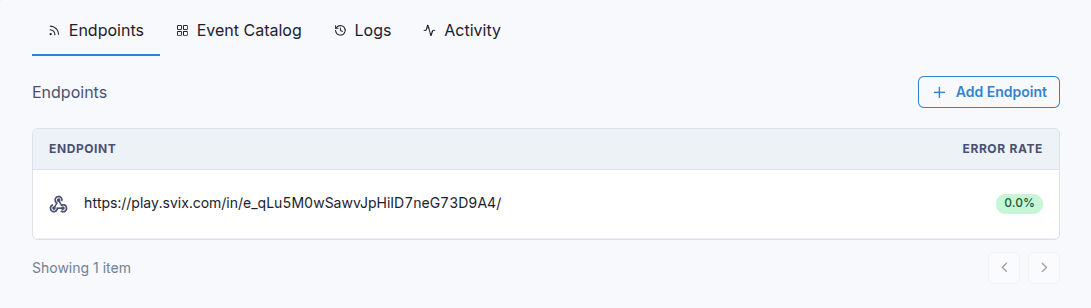
If you do not have a webhook receiver, use the portal to generate a temporary test URL. It lets you inspect payloads before you build your own endpoint. If you use a no code tool that gives you a webhook URL, paste that URL into the portal.
In the portal, click Add endpoint, paste your URL, then choose the events you want. If you do not select events, your endpoint receives every event type.
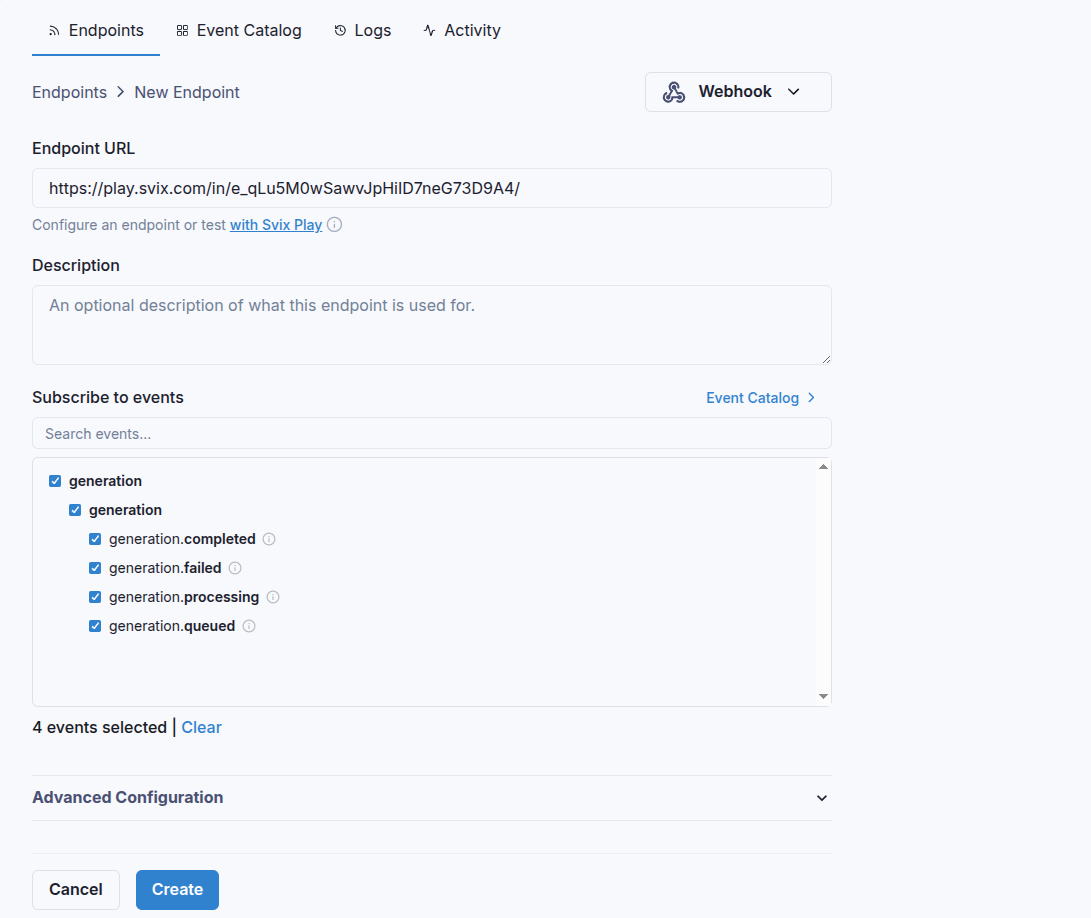
After you create the endpoint, copy the signing secret from the endpoint details and store it in your secret manager. You will use it to verify signatures.
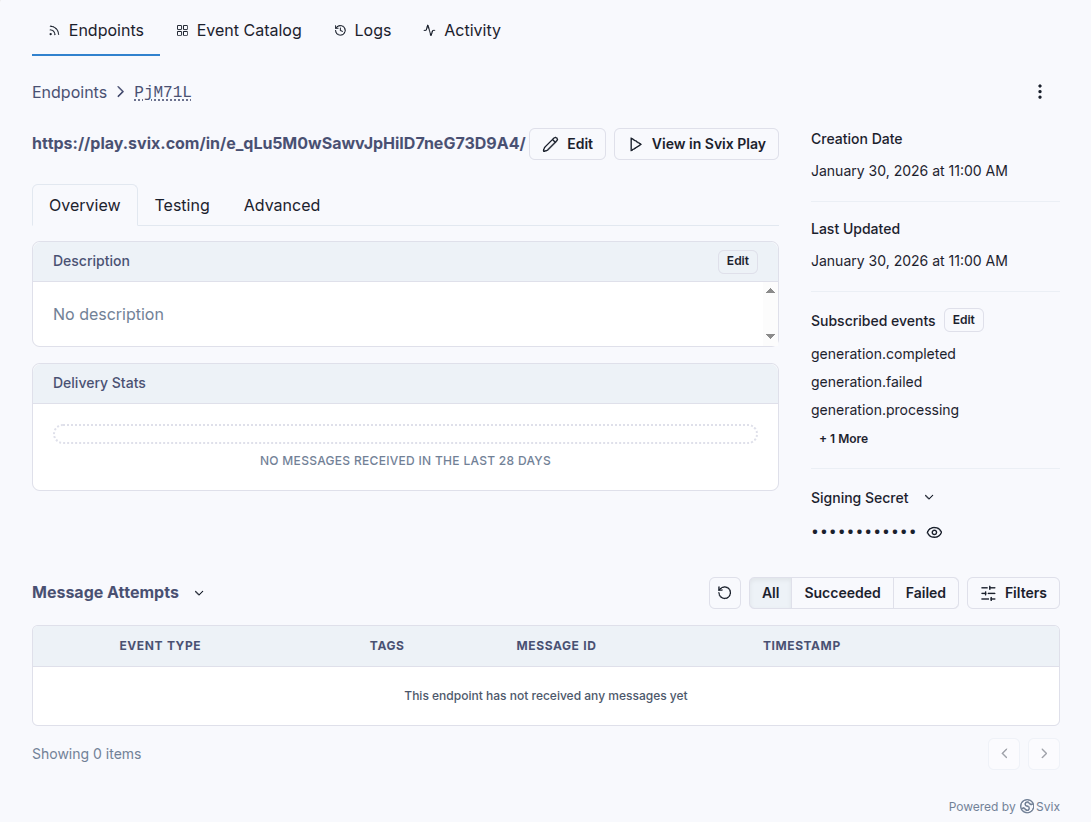
Use the portal Testing tab to send example events, or send a test event from the SDKs. Test events return a message id so you can locate the delivery in the portal.
from diffio import DiffioClientclient = DiffioClient(apiKey="diffio_live_...")result = client.webhooks.send_test_event( eventType="generation.completed", mode="live", samplePayload={"apiProjectId": "proj_123"},)print(result.svixMessageId)import { DiffioClient } from "diffio"const client = new DiffioClient({ apiKey: "diffio_live_..." })const result = await client.webhooks.sendTestEvent({ eventType: "generation.completed", mode: "live", samplePayload: { apiProjectId: "proj_123" }})console.log(result.svixMessageId)curl https://api.diffio.ai/v1/webhooks/send_test_event \ -H "Authorization: Bearer diffio_live_..." \ -H "Content-Type: application/json" \ -d "{\"eventType\": \"generation.completed\", \"mode\": \"live\"}" You can pass samplePayload to override fields like apiProjectId and generationId for testing.
Signature verification ensures the webhook really came from Diffio. Use the Diffio SDK helpers and always verify against the raw request body, not a parsed JSON object.
import express from "express"import { DiffioClient } from "diffio"const app = express()const client = new DiffioClient({ apiKey: process.env.DIFFIO_API_KEY })app.post("/webhooks/diffio", express.raw({ type: "application/json" }), (req, res) => { try { const event = client.webhooks.verifySignature({ payload: req.body, headers: req.headers, secret: process.env.DIFFIO_WEBHOOK_SECRET }) console.log("Webhook received", event.eventType) res.status(200).send("ok") } catch (err) { res.status(400).send("Invalid signature") }})app.listen(3000)from fastapi import FastAPI, Request, HTTPExceptionfrom diffio import DiffioClientimport osapp = FastAPI()client = DiffioClient(apiKey=os.environ["DIFFIO_API_KEY"])@app.post("/webhooks/diffio")async def diffio_webhook(request: Request): payload = await request.body() try: event = client.webhooks.verify_signature( payload=payload, headers=request.headers, secret=os.environ["DIFFIO_WEBHOOK_SECRET"], ) except Exception: raise HTTPException(status_code=400, detail="Invalid signature") print("Webhook received", event.eventType) return {"ok": True} The verifier expects svix-id, svix-timestamp, and svix-signature headers.
Diffio retries failed deliveries with exponential backoff. A typical schedule looks like this, starting immediately after the first failure.
You can also retry messages manually from the portal, or recover all failed messages from a chosen time window.
200Success, treated as complete. response for success and any other status for failure. A 200Success, treated as complete. response always marks the delivery successful. If an endpoint is disabled after repeated failures, enable it again in the portal. To replay messages, open the endpoint, choose Options, then Recover failed messages for a time window. You can also resend a single message from its attempt list.
Use this reference to plan Diffio API requests and responses. All endpoints use JSON over HTTPS at https://api.diffio.ai/v1.
Use the production base URL for all API requests.
https://api.diffio.ai/v1Append the endpoint path to the base URL when calling the REST API directly.
Send the API key on every request using one of the supported headers.
Authorization: Bearer <apiKey>X-Api-Key: <apiKey>Xi-Api-Key: <apiKey>Use API keys with read and write permissions that match the endpoint.
/v1 endpoints use POST with JSON bodies.OPTIONS is accepted for CORS preflight.Content-Type: application/json for JSON payloads.apiProjectId.create_project returns uploadUrl and uploadMethod. Use the returned method and set Content-Type to match contentType. get_generation_download are signed and expire after about two hours. Errors return JSON with an error message. Some errors include additional fields such as code or billing metadata.
{ "error": "Payment failed. Update your payment method in the billing portal.", "code": "paymentFailed"} Billing holds return 402Payment required, billing issue such as paymentFailed. API usage can be blocked until billing is updated. with code paymentFailed. API usage can be blocked until billing is updated. Spend limit errors use spendLimitExceeded.
Rate limits and spend limits depend on your plan and API key settings. Review the API pricing page for current limits and use the developer dashboard to monitor usage.
Use these endpoints to create projects, run generations, and send test webhooks.
/v1/diffio-2.0-generation
Queue a generation using the diffio-2 model.
/v1/diffio-3.5-generation
Queue a generation using the diffio-3.5 model.
/v1/get_generation_progress
Fetch progress and job stages for a generation.
/v1/get_generation_download
Return a signed download URL for a generation output.
/v1/list_project_generations
List generations for a project.
We could not find details for this endpoint.
We could not find details for this endpoint.
We could not find details for this endpoint.
We could not find details for this endpoint.
We could not find details for this endpoint.
We could not find details for this endpoint.
We could not find details for this endpoint.
We could not find details for this endpoint.