
Developers
Webhooks
Configure webhook endpoints, verify signatures, and recover from delivery failures. Get setup details, API behavior, responses, and workflows.
Webhooks let Diffio notify your system when a generation changes status, so you do not need to poll for media completion. This guide walks through opening the portal, adding an endpoint, testing delivery, verifying signatures, and recovering from failures.
Intro
A webhook is a POST request that Diffio sends to a URL you control. Use one endpoint per service, and let that endpoint handle every event type you subscribe to. Respond with a 200Success, treated as complete. response quickly so delivery is marked successful. If your framework enables CSRF protection, disable it for this endpoint.
Each API key maps to its own webhook application, and each endpoint has its own signing secret. Webhook events are scoped to the API key that created the endpoint.
The Diffio SDKs expose a webhooks client. In Python use send_test_event. In JavaScript use sendTestEvent. These call POST /v1/webhooks/send_test_event under the hood.
Events and payloads
Diffio emits events only when a generation status changes.
generation.queuedwhen a generation is queued.generation.processingwhen processing begins.generation.failedwhen processing fails.generation.completedwhen required media processing and settlement finish.
Each webhook payload includes eventType, eventId, createdAt, apiKeyId, apiProjectId, generationId, status, hasVideo, modelKey, error, and errorDetails. The status values are queued, processing, error, and complete.
Payloads can also include transcription with status set to pending, available, or unavailable. Diffio 4.5 transcribes the recording before restoration starts, so a completed generation has its transcript.
Older payloads can omit transcription. After signature verification, SDKs expose the optional field as event.transcription, with undefined in Node or None in Python when absent. Absence does not establish transcript availability.
{ "eventType": "generation.completed", "eventId": "evt_123", "createdAt": "2026-01-28T12:34:56Z", "apiKeyId": "key_123", "apiProjectId": "proj_123", "generationId": "gen_123", "status": "complete", "hasVideo": false, "modelKey": "diffio-4.5-flash", "transcription": { "status": "pending" }, "error": null, "errorDetails": null}Add an endpoint
- 1
Create an API key
Create an API key before you set up webhooks. Webhook endpoints and events are tied to the API key that creates them. Use the developer dashboard to create your key.
- 2
Open the webhook portal
You can open the portal from the developer dashboard to configure endpoints.
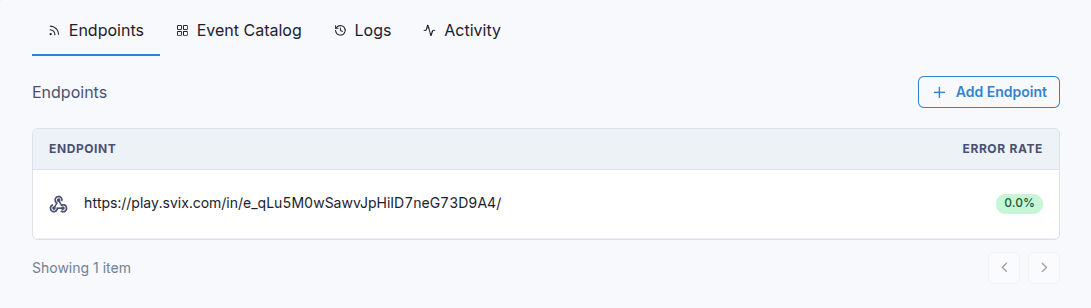
Open the webhook portal from the developer dashboard and use Add endpoint to get started. No server yetIf you do not have a webhook receiver, use the portal to generate a temporary test URL. It lets you inspect payloads before you build your own endpoint. If you use a no code tool that gives you a webhook URL, paste that URL into the portal.
- 3
Add your endpoint URL and events
In the portal, click Add endpoint, paste your URL, then choose the events you want. If you do not select events, your endpoint receives every event type.
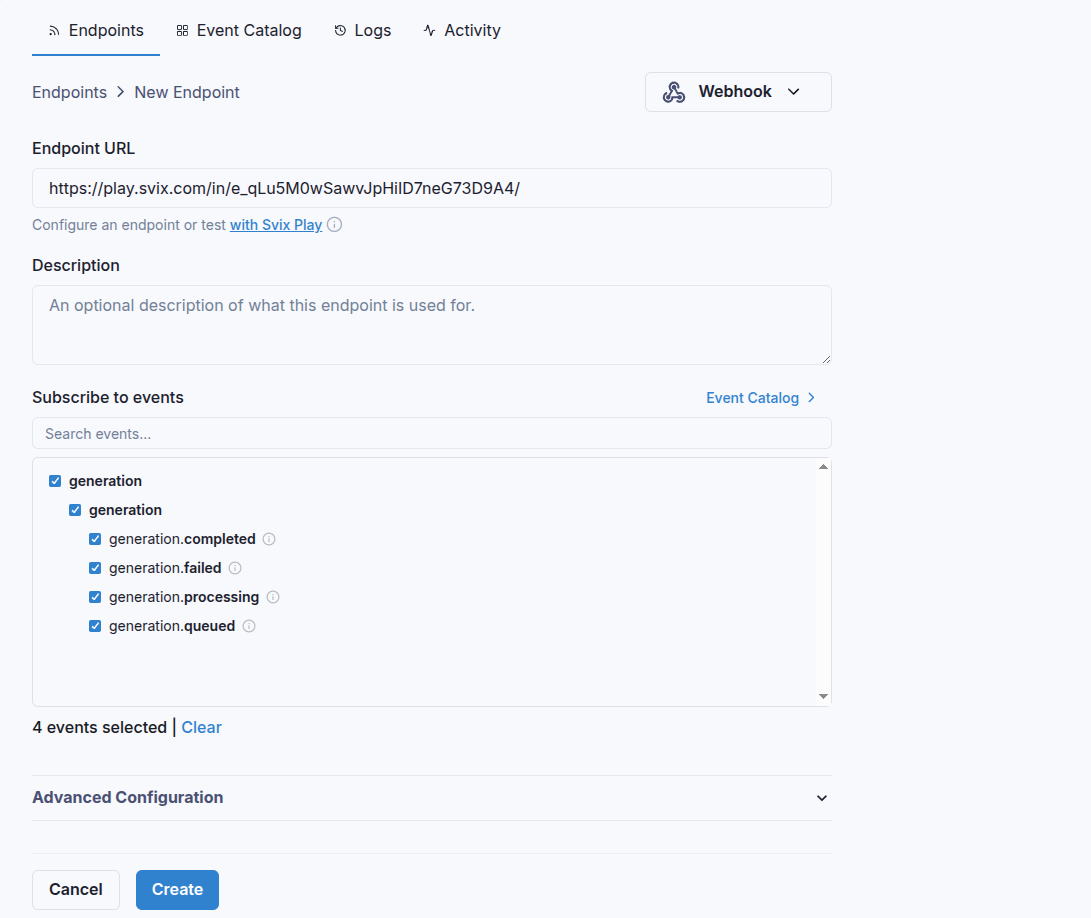
Choose the events, add your destination URL, and use Create test link to get a temporary receiver URL. - 4
Save the signing secret
After you create the endpoint, copy the signing secret from the endpoint details and store it in your secret manager. You will use it to verify signatures.
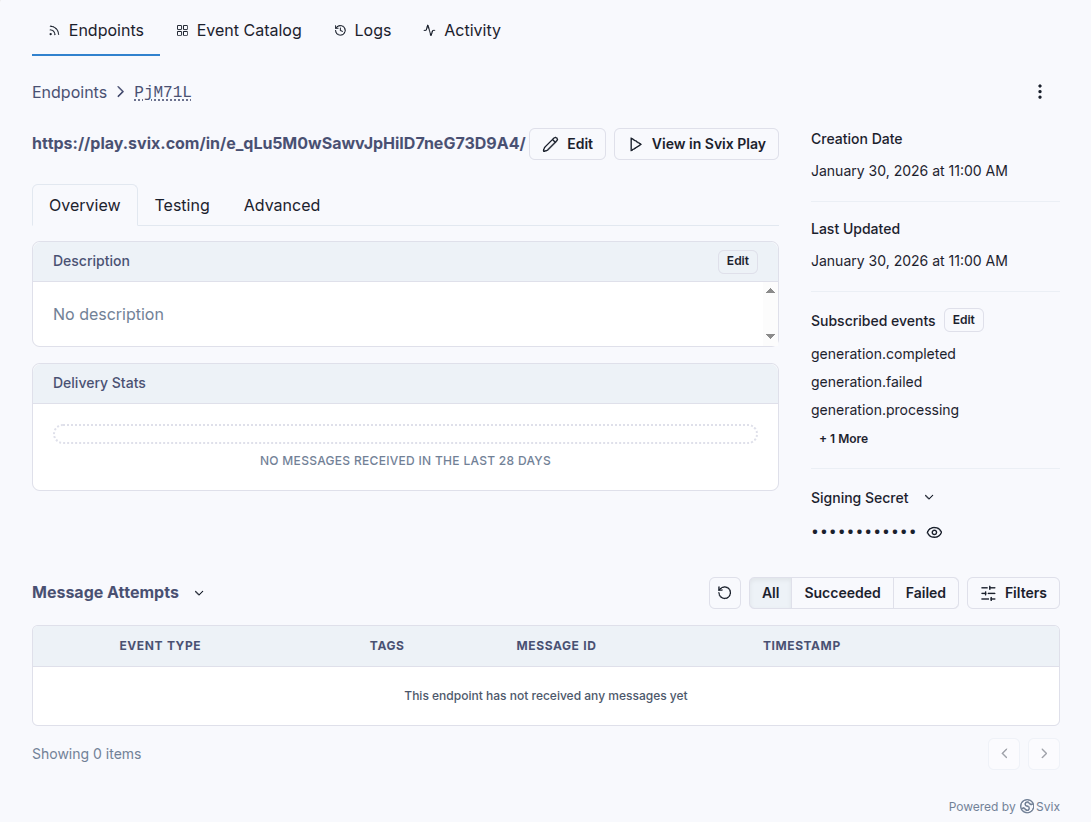
After creation, open the endpoint details and copy the signing secret.
Test endpoints
Use the portal Testing tab to send example events, or send a test event from the SDKs. Test events return a message id so you can locate the delivery in the portal.
SDK and REST test events require an Agent key or a scoped key with webhooks:write. If you use an Agent key, pass the target apiKeyId for the webhook app you want to test.
import osfrom diffio import DiffioClientclient = DiffioClient(apiKey=os.environ["DIFFIO_WEBHOOK_KEY"])result = client.webhooks.send_test_event( eventType="generation.completed", mode="live", apiKeyId=os.environ["DIFFIO_API_KEY_ID"], samplePayload={"apiProjectId": "proj_123"},)print(result.svixMessageId) You can pass samplePayload to override fields like apiProjectId and generationId for testing.
Verify signatures
Signature verification ensures the webhook really came from Diffio. Use the Diffio SDK helpers and always verify against the raw request body, not a parsed JSON object.
from fastapi import FastAPI, Request, HTTPExceptionfrom diffio import DiffioClientimport osapp = FastAPI()client = DiffioClient(apiKey=os.environ["DIFFIO_API_KEY"])@app.post("/webhooks/diffio")async def diffio_webhook(request: Request): payload = await request.body() try: event = client.webhooks.verify_signature( payload=payload, headers=request.headers, secret=os.environ["DIFFIO_WEBHOOK_SECRET"], ) except Exception: raise HTTPException(status_code=400, detail="Invalid signature") print("Webhook received", event.eventType) return {"ok": True} The verifier expects svix-id, svix-timestamp, and svix-signature headers.
Retries
Diffio retries failed deliveries with exponential backoff. A typical schedule looks like this, starting immediately after the first failure.
- Immediately
- After 5 seconds
- After 5 minutes
- After 30 minutes
- After 2 hours
- After 5 hours
- After 10 hours
- After 10 more hours
You can also retry messages manually from the portal, or recover all failed messages from a chosen time window.
Troubleshooting and recovery
Troubleshooting tips
- Verify the raw payload, not a reserialized JSON string. Changing formatting breaks signature verification.
- Confirm the signing secret matches the endpoint you are verifying. Secrets are unique to each endpoint.
- Return a
200Success, treated as complete. response for success and any other status for failure. A200Success, treated as complete. response always marks the delivery successful. - Respond quickly and queue heavy work. Slow responses lead to timeouts and retries.
Failure recovery
If an endpoint is disabled after repeated failures, enable it again in the portal. To replay messages, open the endpoint, choose Options, then Recover failed messages for a time window. You can also resend a single message from its attempt list.