Audio cleaner for speech recordings
Your speech recording, audio or video, comes back with background noise removed, room echo reduced and supported clipping repaired.
It works after the fact, on the file you already have, and keeps the original next to the result so you can judge it yourself. Results depend on the recording.
Free plan: 3 uploads, audio or video, each with a 2-minute preview of the result. Full playback and downloads from $8 per month.
Five real recordings, before and after
Real recordings from Wikimedia Commons and the Internet Archive, restored on October 19, 2026. Nothing was added to the originals, and every version plays at the same loudness.
The ring announcer at the Farndale Show, a village agricultural show in North Yorkshire, recorded on the show ground. Recorded August 27, 2018.
Listen for: The voice comes through the PA speakers from across the field, with livestock, vehicles and the show crowd around it.
Read what's said
They are in the secretary's gazebo, which is the green gazebo around the main ring. That's a pair of waterproof trousers. If you've lost them, they are at the secretary's tent in the main ring.
Source: Farndale Show Soundscape, david m (radio aporee), CC BY 3.0. Excerpt restored by Diffio on October 19, 2026.
What a speech recording can get back
Diffio is built for recorded speech: interviews, lectures, podcasts, field recordings and calls, indoors or out. Each sample above shows one of these problems.
Background noise and hum
Crowds, traffic, air conditioning, hiss and steady electrical hum come out of the speech, whether the noise changes every second or never moves. More in our guide to removing background noise from audio.
Room echo and reverb
A lecture theatre or a bare apartment makes a voice sound far away. Echo reduction brings it back toward the mic, and long echo is where the Pro model earns its time. Read more about reducing echo in recordings.
Clipping and distortion
When the level was set too high, loud syllables flatten and crackle. Diffio repairs supported clipping and distortion; the distorted audio guide goes deeper.
Speech that's quiet or far from the mic
A phone on a lectern or a recorder at the back of a room catches quiet speech mixed with the room. The restored speech comes back at a usable level without the room.
Video soundtracks
Upload a video and get the same video back with a restored soundtrack. The picture isn't touched.
Two tracks, and a transcript
Every result has restored speech and a separate background track, where music, applause and crowd sound go instead of being deleted. The Background amount slider mixes back as much as you want. Each project includes a transcript.
From upload to restored speech in 3 steps
These are screenshots of the real app, taken on October 19, 2026 while restoring the show announcer sample above.
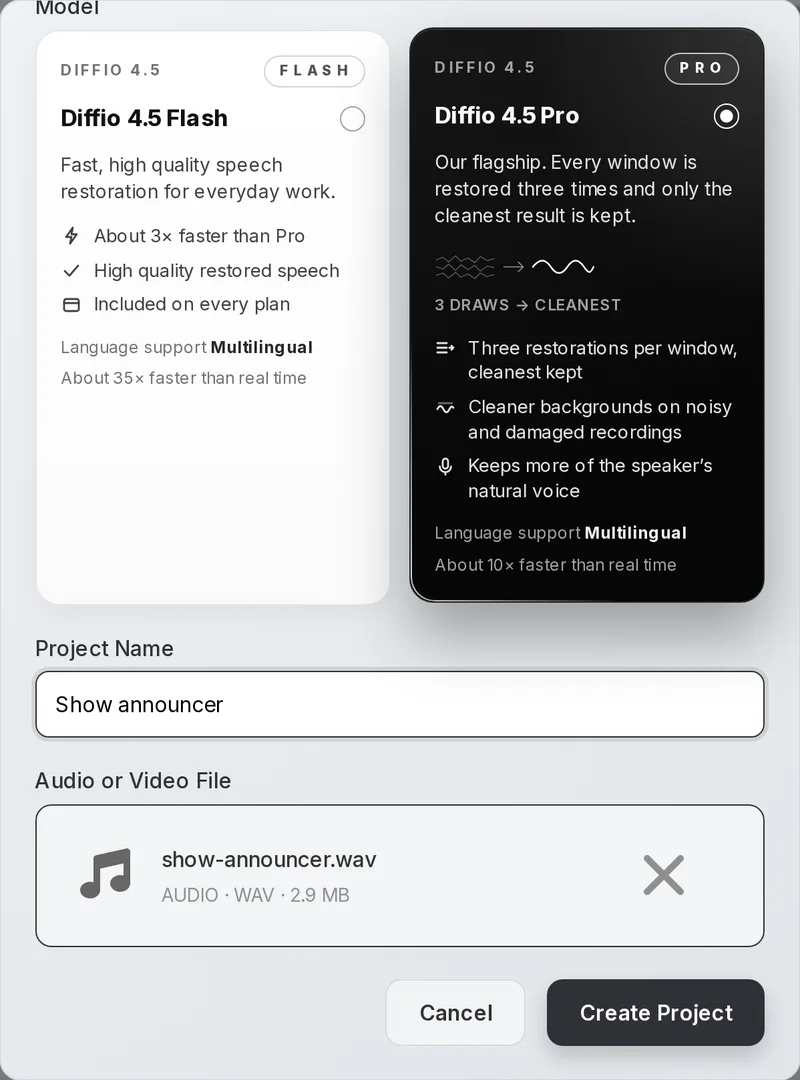
Upload the original and choose a model
Name the project, add the file and pick Diffio 4.5 Flash or Diffio 4.5 Pro. Flash is fast (about 35× real time) and is on every plan. Pro restores every window 3 times and keeps the cleanest (about 10× real time). Audio and video files up to 90 minutes and 2 GB are accepted.
Let it restore
The project page shows each stage while the restore runs. A short clip is usually done in about a minute, and you can leave the page and come back to it.
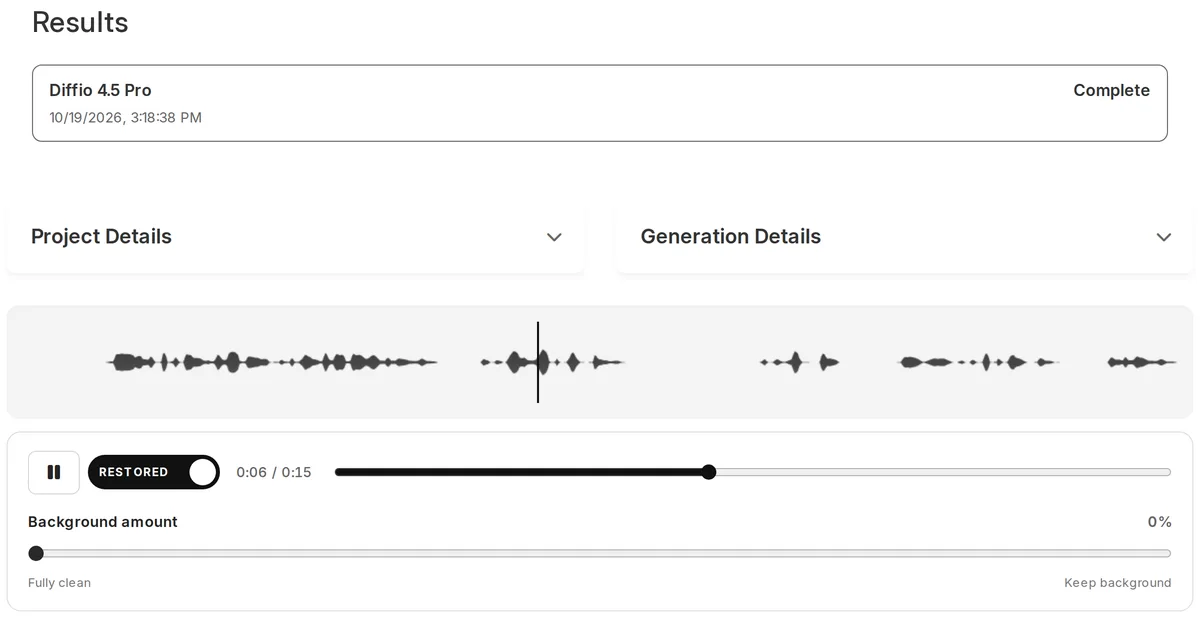
Compare, then download
Press play and flip between Original and Restored at the same moment. Set the Background amount, read the transcript, then download the restored speech or the full video on a paid plan.
Who usually brings a recording like this
- Podcasters with a guest who joined from a kitchen, a car or a hotel room. See the podcast audio guide.
- Video producers and YouTubers whose on-camera audio picked up the street, the wind or the air conditioning.
- Reporters with a hallway interview or a press scrum that can't be repeated.
- Teachers and lecturers whose talks were recorded from the back of a hall. See the lecture recording guide.
- Families and archivists with old tapes, voicemails and home recordings. See restoring old recordings.
- Developers adding speech restoration to their own product with the Diffio API, which runs the same models.
"Back in the 1980s I recorded a series of lectures that had excellent content but only marginal audio quality, on cassette tapes. It would be impossible to reproduce them now with the same energy. The lectures are now being reproduced with near studio quality audio and enjoyed by many who weren't even alive when I first delivered them."
Restoration compared with fixing it by hand
Desktop editors are the other route, where you remove the noise by hand. Audacity is free and careful with steady noise when you can give it a sample of that noise. iZotope RX is the standard for manual, surgical repair. Both reward time and skill; Diffio does speech restoration without setup.
| Comparison point | Diffio | Audacity Noise Reduction | iZotope RX 12 |
|---|---|---|---|
| Where it runs | Browser, plus a REST API | Free desktop editor | Desktop editor and plugins for your DAW or video editor |
| How you work | Upload, pick Flash or Pro, compare with the original | Select a stretch of noise only, save it as a noise profile, then apply it to the track | Choose and tune modules such as Spectral De-noise, De-hum, De-clip and Dialogue Isolate |
| Changing noise like crowds or traffic | Removed from the speech in the same pass | The manual says it isn't suitable for irregular noise such as traffic or an audience | Handled with the right modules and settings |
| Echo and clipping | Echo reduced and supported clipping repaired in the same pass | Separate effects, set by hand | Separate modules, set by hand |
| Video files | Upload the video, get it back with the soundtrack restored | Audio editing; export and re-sync yourself | Audio editing; round-trip through your video editor |
| Price to start | Free plan, then $8/month | Free | $99 (Elements), $399 (Standard), $1,399 (Advanced) |
| Best for | Speech you need back without learning a tool | Steady hiss or hum on a budget | Detailed repair work, music and dialogue editing |
Sources: Audacity manual, Noise Reduction page; izotope.com RX 12 page. Checked October 19, 2026. For AI tools such as Adobe Podcast and Auphonic, see our comparison of AI audio cleaners.
What it costs and what each plan includes
| Plan | Price | Restoring | Models | Playback and download |
|---|---|---|---|---|
| Free | $0 | 3 uploads in total, audio or video | Diffio 4.5 Flash | First 2 minutes of each result; no download |
| Basic | $8/month | 6 hours (360 minutes) per month | Flash and Pro | Full playback, download and export |
| Pro | $29/month | 30 hours (1,800 minutes) per month | Flash and Pro | Full playback, download and export |
| API | Pay as you go | Billed per second, $5 of free credit | Flash about $5/hour, Pro about $10/hour | Results returned to your app |
Every plan, Free included, takes audio and video files up to 90 minutes and 2 GB. Downloads require a paid plan. The Pro model is included in Basic; the Pro plan adds hours. Current prices are on the pricing page, and API rates are on API pricing.
Questions people ask before uploading a recording
What is an audio cleaner?
An audio cleaner removes the sound you don't want from a recording, usually background noise, hum or room echo. Some are general noise filters. Diffio restores speech and keeps everything else in a separate background track. For other tools side by side, see our comparison of AI audio cleaners.
How do I improve the audio quality of a recording?
Upload the original file, choose Diffio 4.5 Flash or Diffio 4.5 Pro and let it restore. Play the result and switch to the original at the same point to check the hard passages. Raise the Background amount slider if you want some room sound back, then download.
Can I clean audio online for free?
Yes. The Free plan includes 3 uploads, audio or video, restored with Diffio 4.5 Flash. You can play the first 2 minutes of each result in your browser. Full playback and downloads start with the Basic plan at $8 per month.
Will it improve the audio quality of music?
No. Diffio restores speech. Music and crowd sound are separated into the background track, so you can mix them back in, but they aren't restored. For a song, a music tool is the better choice.
Which recordings are hardest to restore?
Results depend on the recording. The hardest cases are a speaker very far from the mic, two people talking over each other, speech buried under loud music and clipping so severe that most of the voice is flattened. Diffio doesn't split overlapping speakers into separate tracks. Pro is the one to use if the room was echoey or the noise is heavy, and the original stays in the player so you can judge the result yourself.
Does it work on video files?
Yes, on every plan, including Free. Upload MP4, MOV, AVI, MKV or WebM and Diffio restores the soundtrack. The picture isn't touched. There is more on this on the background noise removal for video page.
Does it work during a live call?
No. Diffio works after the fact, on a recording that already exists. Krisp is built for noise suppression during live calls. Record the call, then upload the file afterward.
Which file formats and lengths can I upload?
Audio: MP3, WAV, M4A, AAC, FLAC and OGG. Video: MP4, MOV, AVI, MKV and WebM. Each file can be up to 90 minutes long and up to 2 GB, on every plan.
Should I use Flash or Pro?
Start with Flash for a recording with mild noise. It runs at about 35× real time. Use Pro for a hard room, heavy noise or a recording you can't make again: it restores every window 3 times and keeps the cleanest, at about 10× real time. The Pro model is included in the Basic plan.
The recording you have is the best test
Upload the clip you're worried about, listen to the restored speech next to the original and decide from there. The Free plan includes 3 uploads, audio or video.
Recordings: PA at an outdoor show by david m (radio aporee), CC BY 3.0; Room echo by Pangalau, CC0 1.0; Electrical hum by Austin L. Blair (MrABlair23), Public domain; Overloaded recorder on a train by kerouacsamerica (Kerouac's America, SUNY Potsdam), Freesound, CC BY 3.0; Quiet, distant speech by Pierrot Desperes (radio aporee), Public domain. Restored versions and the walkthrough video share each recording's license. Full source and processing record.