Remove echo from audio
Diffio reduces room echo and reverb in speech you’ve already recorded, from audio or video files, in your browser.
The talk was given in a hall that rang. The interview happened in a room full of glass. You can’t record either one again, so upload the file you have and hear the restored speech next to the original.
Free plan: 3 uploads, audio or video, with a 2-minute preview of each result. Downloads and the Pro model from $8 per month.
Five echoey recordings, before and after
Each clip is a real recording from a hard room, restored with both Diffio models on October 19, 2026. Press play, then switch versions. Your place in the clip stays the same.
A homily in the Calvary chapel of the Church of the Holy Sepulchre, Jerusalem, recorded by a camera a few steps from the priest.
Stone and mosaic everywhere. In the original, each sentence is still ringing when the next one starts.
Fr. John Faris, July 25, 2015. Sermon at Calvary, Church of the Holy Sepulchre, Fabricio E. Lomanto, CC BY 3.0. Excerpt 0:12.7 to 0:50.6, restored October 19, 2026.
How these comparisons were made
Each excerpt comes from the openly licensed or public domain file credited under the player, with no noise or processing added. We restored it once with each model and kept the restored speech with no background mixed in. Each version has one fixed volume change so all three play at about the same loudness. None of the speakers or organizations is a Diffio customer or endorses Diffio. Full credits and the source and result record are published with the files.
What changes in an echoey recording
Echo vs reverb
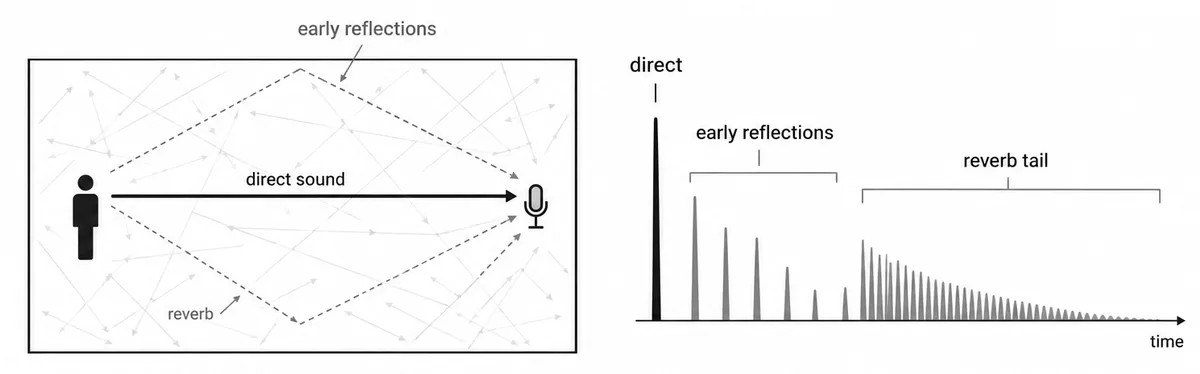
A microphone in a room hears the voice more than once. First comes the direct sound, straight from mouth to mic. Then the same voice arrives again off the walls, floor and ceiling, a little later and quieter each time.
When one reflection comes back late enough to pick out, like a shout off the far wall of a gym, that’s an echo. When thousands overlap into a wash that trails every word, that’s reverb. Most recordings people call echoey are mostly reverb: hard surfaces, high ceilings and a mic across the room. Engineers call reducing it de-reverb.
What you get back
- Words that stop where they should. The tail after each syllable shortens, so words stop smearing together.
- Consonants you can hear again. The t, s and k sounds that reverb buries come forward.
- A voice that sounds closer to the mic, without the hollow edge of the room.
- Background noise removed too. HVAC hum and hiss come out along with the reverb, and crowd sound is separated into the background track. See removing background noise from audio for recordings where noise is the bigger problem.
- Your choice of how much room to keep. Diffio returns restored speech and the background as separate tracks. The Background amount slider mixes some of it back in when a scene needs applause or ambience.
- Video with the same picture. Upload a video and Diffio restores the speech in the soundtrack. The picture isn’t touched.
- A transcript. Each project comes with a high quality transcript.
How to remove echo from audio in 3 steps
Upload the original
Use the rawest file you have: MP3, WAV, M4A, AAC, FLAC or OGG audio, or MP4, MOV, AVI, MKV or WebM video. Each file can be up to 90 minutes and 2 GB on every plan.
Choose Diffio 4.5 Pro for an echoey room
Pro is the one to use if the room was echoey. It restores every window of audio 3 times and keeps the cleanest, at about 10× faster than real time. Diffio 4.5 Flash is about 3× faster than Pro and works well when the room was only a little live. The Pro model is included in Basic, so you don’t need the Pro plan to use it.
Compare, then export
Play the result and switch between the original and restored speech on the same playhead. Set the Background amount, then download restored speech or the full video on a paid plan.
For Flash and Pro on one longer recording, follow a full recording rescue.
Talks, sermons, interviews and meetings recorded in hard rooms
Echo usually isn’t anyone’s fault. The room was booked, the mic was where it was, and the talk happened once.
- Educators and lecture capture teams with classes recorded from the back of a hall. More on restoring lecture recordings.
- Podcasters and interviewers whose guest joined from a kitchen, a stairwell or an empty office. See interview audio cleanup and the podcast audio guide.
- Churches and event teams with services and panels recorded from the room, not the sound desk.
- Video producers with a camera mic across the room, or a lav that slipped. The video speech page covers the picture side.
- Reporters and newsrooms who got the quote in a hallway, a gym or a council chamber.
- Developers using the Diffio API, with Python and Node SDKs.
Your options for an echoey recording
Each of these tools is good at something. The right one depends on how much tuning you want to do.
| Compared on | Diffio | iZotope RX 12 De-reverb | Audacity | Adobe Podcast Enhance Speech |
|---|---|---|---|---|
| How it works | Browser upload; speech restoration reduces reverb and noise together | Desktop editor module, plus DAW and video editor plugins | Free, open source desktop editor | Browser upload, one pass through Enhance Speech |
| Good at | Hard rooms, with nothing to tune | Manual, surgical repair with control over every setting | Free editing and constant hum or hiss | A free quick pass on short files |
| Echo and reverb | Reduced as part of every result; Pro for echoey rooms | De-reverb is included in Elements, Standard and Advanced | Built-in repair tools are Noise Reduction, Noise Gate and Notch Filter, aimed at constant noise | Handled inside the single Enhance Speech pass |
| Video | Yes, picture unchanged, Free included | Through plugins in your video editor | Audio files | Audio only on the free tier |
| Price | Free plan, then $8/month | Elements $99, Standard $399, Advanced $1,399 | Free | Free tier: files up to 30 minutes and 500 MB |
| Trade-off | Speech only; results depend on the recording | You set the amounts by ear, and there’s a learning curve | No dedicated de-reverb in the built-in tools | Audio only and no strength control on the free tier |
Competitor details from izotope.com (RX 12 product page), support.audacityteam.org (noise reduction guide) and Adobe’s Podcast plans page, checked October 19, 2026.
Pick iZotope RX to shape the result yourself in a DAW, Audacity for free editing of a steady hum and Adobe Podcast for a quick free pass on a short audio file. Pick Diffio when the room is the problem or the recording is a video. More in Diffio vs iZotope RX and the Adobe Podcast comparison.
What it costs to restore an echoey recording
Start on the Free plan with your toughest clip. Every plan accepts files up to 90 minutes and 2 GB.
Free
Try it on your own recording
- 3 uploads, audio or video
- 2-minute preview of each result
- Diffio 4.5 Flash
- Preview only; download on Basic or Pro
Basic
Full results and the Pro model
- 6 hours of audio or video per month
- Diffio 4.5 Flash and Diffio 4.5 Pro
- Full playback and downloads
- Video included
Pro
For teams restoring every week
- 30 hours of audio or video per month
- Diffio 4.5 Flash and Diffio 4.5 Pro
- Full playback and downloads
- Video included
Developers can use the same models through the API, at about $5 per hour for Flash and about $10 per hour for Pro, with $5 of free credit. See API pricing or the full plan details.
Questions about echo in recordings
How do I remove echo from audio?
Upload the original recording, choose Diffio 4.5 Pro if the room was echoey and compare the result with the original on the same playhead. Download the restored speech or the full video on a paid plan.
What is the difference between echo and reverb?
Echo is a repeat you can pick out. Reverb is thousands of reflections blurred into a wash that trails every word. Diffio reduces both in recorded speech.
Will all of the echo come out?
Results depend on the recording. A voice a few feet from the mic comes back further than one recorded from the back of a large hall, where the room is louder than the speaker. Try your own file and compare.
Can I remove echo from a video?
Yes. Upload MP4, MOV, AVI, MKV or WebM video on any plan, including Free. Diffio restores the speech in the soundtrack and leaves the picture as it was. More on restoring speech in video.
Should I use Flash or Pro for an echoey room?
Pro is the one to use if the room was echoey. Flash is about 3× faster and is the model on the Free plan. The Pro model is included in Basic, so you don’t need the Pro plan to use it.
Will the speaker still sound like themselves?
The voice usually sounds closer and drier, as if the mic had been nearer. If it feels too dry for the scene, the Background amount slider mixes some of the background back in.
What can echo reduction not fix?
Speech recorded from far away, where the room drowns out the voice, improves less. Two people talking at once stay together in one restored speech track, because Diffio doesn’t separate speakers. Severe clipping on top of heavy reverb limits the result.
Can I remove reverb from music or singing?
Diffio restores speech. Music and singing are separated into the background track rather than restored, so for reverb on a vocal or an instrument, a music tool or a DAW plugin is the better fit.
Is it free to try?
Yes. The Free plan includes 3 uploads, audio or video, with a 2-minute preview of each result on Diffio 4.5 Flash. Full playback, downloads and the Pro model start with Basic at $8 per month. See plans and limits.
The take you can’t redo, with less of the room in it
Upload your toughest clip and hear the restored speech next to the original. Results depend on the recording, which is why the first 3 are free.