Remove background noise from video
Diffio removes background noise from the speech in videos you've already shot. Upload an MP4, MOV, AVI, MKV or WebM and you get the same video back with the speech restored. The picture isn't touched, so there's nothing to re-sync.
The wind picked up halfway through the interview. Traffic ran under every word of the street interview. The filter machinery never stopped during the walkthrough. You can't shoot it again, so start with the file you have.
3 free uploads, video included, with a 2-minute preview of each result on Diffio 4.5 Flash. Downloads require a paid plan.
Three noisy videos, before and after
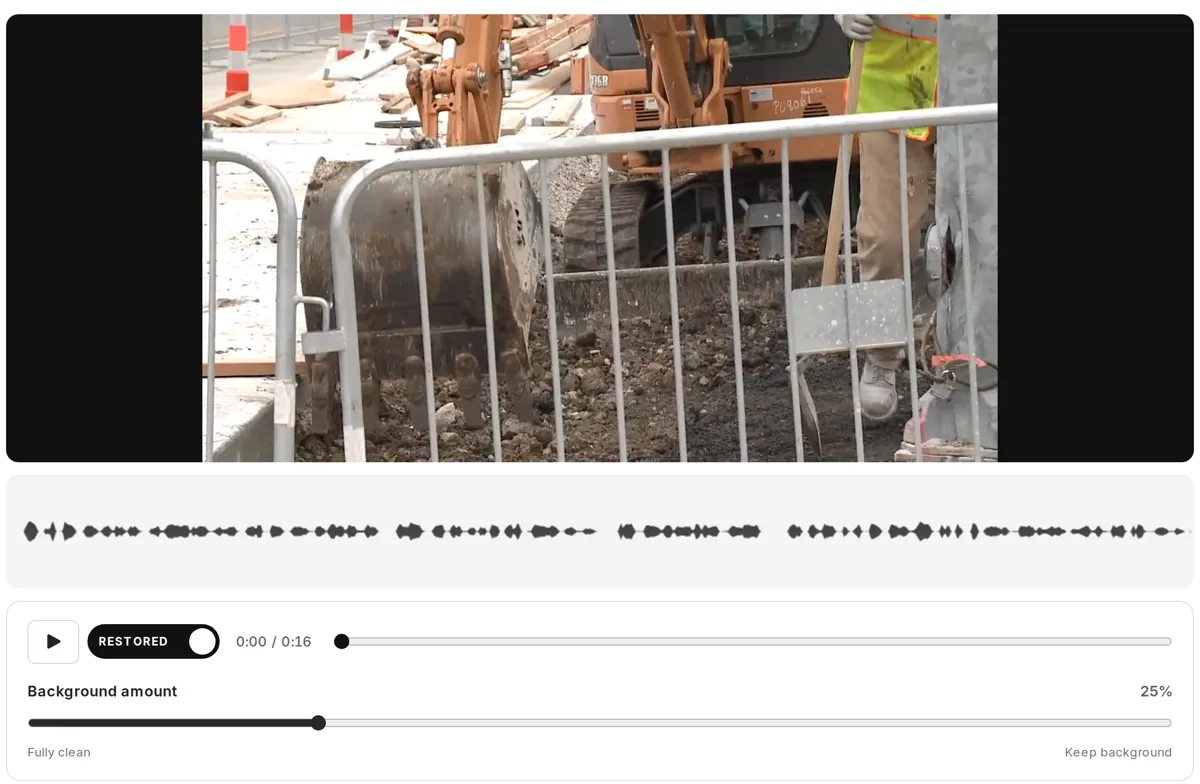
Real videos with real background noise, restored October 19, 2026 with Diffio 4.5 Pro. Switch between the original and restored soundtracks while the picture plays. Both play at the same loudness. Results depend on the recording.
Press play, then switch between Original and Restored. The picture and your place stay the same.
“So rodenticides are very effective at killing rodents, but it doesn't just stop there. What eats the rodent and eats that animal and so on and so forth up the food chain can also be affected. Things like birds of prey and wild cats, coyotes can be affected by rodenticides.”
A U.S. Fish and Wildlife Service biologist outside the Ventura Fish and Wildlife Office in March 2018, with wind gusting across the camera mic. Video by Ashley Spratt, USFWS, public domain. Restored October 19, 2026 with Diffio 4.5 Pro. Source and license
Noise that comes out of a video's soundtrack
Diffio is built for recorded speech. It treats everything that isn't the voice as background, which covers most of what ends up under dialog shot on location:
- Wind on the camera mic. Gusts and rumble on an on-camera or phone mic at a trailhead, beach or rooftop.
- Traffic and street noise. Cars, trucks and horns behind a sidewalk interview or a walk-and-talk. The Kansas City sample above was recorded on a downtown street.
- Crowds and events. Chatter, applause and PA sound at fairs, conferences and receptions.
- Air conditioning, fans and machines. HVAC in an office, a projector fan in a classroom, a generator on a job site. The hatchery sample above was recorded beside filter machinery.
- Camera and phone mic hiss. The noise floor of a built-in mic with the gain turned up.
Room echo is reduced and supported clipping and distortion are repaired in the same pass. For recordings without a picture, see removing background noise from audio.
Nothing that comes out is thrown away. Each result has 2 tracks, restored speech and background, and the Background amount slider mixes some of the background back in when the applause is part of the shot.
How to remove background noise from a video
Fixing the sound in a video usually means pulling the audio out, working on it somewhere else and lining it back up with the picture. Here you upload the video and download the same video with the speech restored.
Upload the video
Drag in an MP4, MOV, AVI, MKV or WebM file up to 90 minutes long and 2 GB, on any plan including Free. The original camera or phone file works best.
Choose a model and restore
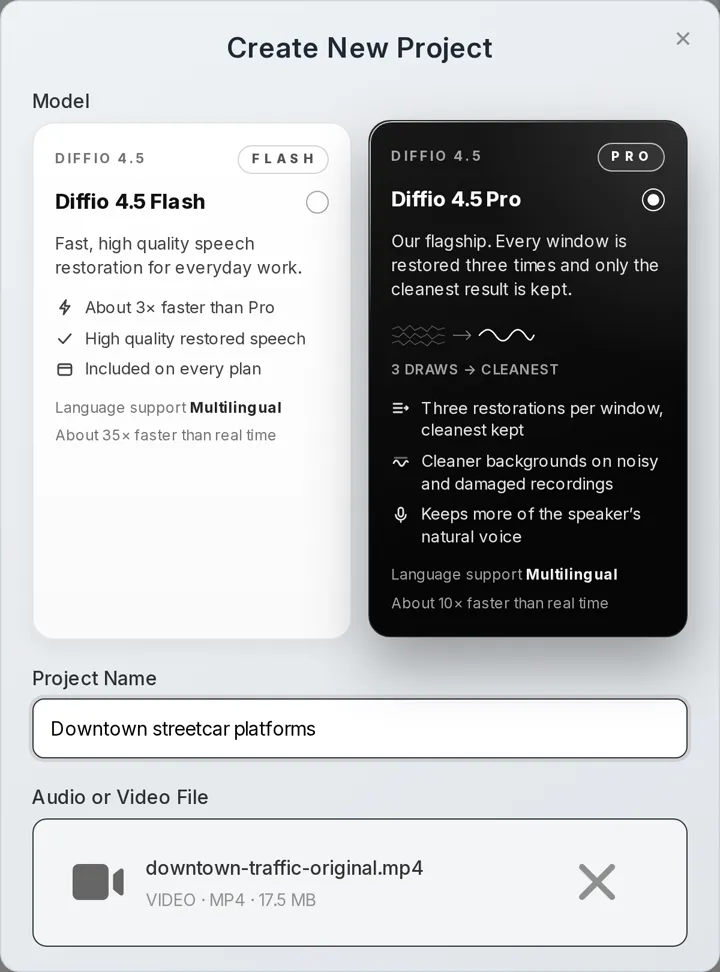
Diffio 4.5 Flash runs about 35× faster than real time and is on every plan. Diffio 4.5 Pro runs about 10× faster and restores every window 3 times, keeping the cleanest result. Pro is the one for wind and crowds, and it's included in Basic.
Compare on the picture, then download
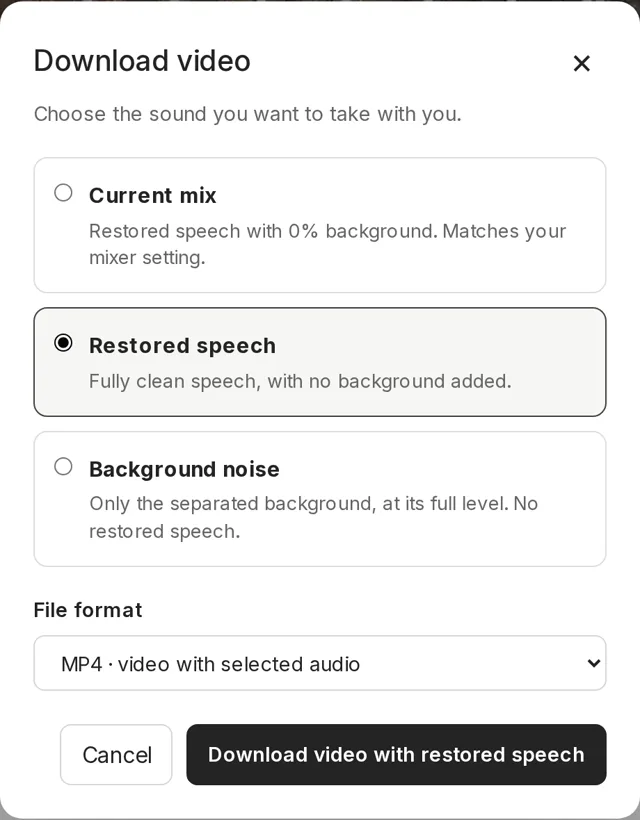
The result plays with the picture. Switch between Original and Restored at the same moment, set the Background amount, then download an MP4 with the restored speech or your mix, or just the audio as a WAV or MP3.
Interviews, vlogs and event videos recorded somewhere loud
- Video producers and YouTubers with on-location interviews and walk-and-talks.
- Vloggers shooting on a phone outdoors, where wind and traffic reach the built-in mic first.
- Reporters and newsrooms with field interviews. See interview audio cleanup.
- Event and wedding videographers with toasts and speeches recorded over a crowd.
- Educators with lecture capture where HVAC runs under every word. See the lecture audio enhancer.
- Podcasters publishing video episodes. See the podcast audio enhancer.
- Developers restoring video soundtracks through the Diffio API, which returns the restored video.
Three ways to fix audio in a video
Audio tools and video editors are good at their jobs. Here's how they compare on noise under speech in a video.
| Comparison | An audio-only tool | Your video editor | Diffio |
|---|---|---|---|
| For example | Audacity, Adobe Podcast Enhance Speech | Clipchamp, DaVinci Resolve Studio | The Diffio web app or API |
| Good at | Cleaning an audio file by hand, or a quick free pass | Fixing sound while you cut and finish the video | Speech in a video you've already shot |
| Getting the sound in | Export the audio from the video first | Work on the clip in a timeline; Clipchamp has you detach its audio first | Upload the video file as it is |
| Getting the video back | Import the cleaned audio and line it up with the picture again | Export the whole video again from the editor | Download the same video with the restored speech |
| Keeping some background | Audacity has a reduction amount; Adobe's free tier has no strength control | Depends on the editor; Clipchamp's noise suppression is on or off | Background amount slider after the restore |
| Cost | Audacity is free; Adobe has a free tier with limits | DaVinci Resolve Studio is $295 | Free plan to try; Basic is $8/month |
Pick Audacity to tune out steady hiss by hand for free, and your editor when you're already cutting the video there. Clipchamp's noise suppression works on detached audio (Clipchamp help page) and DaVinci Resolve Studio includes AI voice isolation (Blackmagic Design product page), both checked October 2026. Adobe Podcast Enhance Speech is a free quick pass on short audio files, up to 30 minutes on the free tier (Adobe plans page, October 2026).
What it costs to restore the speech in your videos
| Plan | Price | Restoration | What's included |
|---|---|---|---|
| Free | $0 | 3 uploads in total | Audio or video, Diffio 4.5 Flash, a 2-minute preview of each result, no downloads |
| Basic | $8/month | 6 hours a month | Flash and Pro models, video, full playback, downloads and export |
| Pro | $29/month | 30 hours a month | Everything in Basic, for people restoring video every week |
| API | Pay as you go | Billed per second | About $5 per hour on Flash and $10 per hour on Pro, $5 of free credit, 60-second minimum per job |
A video counts by its length, the same as audio. A 10-minute vlog every weekday comes to about 4 hours a month, which fits in Basic. Prices were checked on October 19, 2026; the pricing page has the current plans.
Questions about removing noise from video
How do I remove background noise from a video?
Upload the video to Diffio, choose Diffio 4.5 Flash or Pro, compare the result on the picture and download the same video with the speech restored. In a video editor, you apply its noise reduction to the clip's audio; in Clipchamp you detach the audio first, then switch on Noise suppression. Wind, traffic and crowds that keep changing are where a speech model helps most.
Can I remove background noise from a video online for free?
Yes, to try it. The Free plan includes 3 uploads, audio or video, restored with Diffio 4.5 Flash, and you can play the first 2 minutes of each result with the picture. Downloading the video, full playback and the Pro model start with Basic at $8 per month. See plans and limits.
Does Diffio change the picture or the video quality?
No. Diffio restores the soundtrack and leaves the frames alone: no upscaling, denoising or color grading. The MP4 you download has the same picture with the restored speech, or your mix, as its audio, so there's nothing to line up.
Can it remove wind noise from video?
Yes. Wind on a camera or phone mic is common in outdoor video, and the first sample above was recorded in it. Use Diffio 4.5 Pro for strong gusts. Where the wind covers a word completely, there's little of the voice left to restore.
When doesn't background noise removal work well on video?
Results depend on the recording. It's hardest when the noise is louder than the voice, when the speaker is far from the camera mic, when 2 people talk over each other or when the speech is badly clipped. A quiet speaker under a loud crowd is the hardest case, which is why the samples above don't include one; try your own clip on the free preview. Diffio restores speech, so it isn't the tool for music videos.
Which video formats can I upload, and how long can they be?
MP4, MOV, AVI, MKV or WebM, up to 90 minutes long and 2 GB on every plan, including Free. Audio files work too. Both models are multilingual, and speech in English, French, German, Spanish and Portuguese has been validated.
Should I use Flash or Pro for a noisy video?
Start with Diffio 4.5 Flash if the noise is mild, like an office air conditioner. It's about 3× faster than Pro and on every plan. Use Diffio 4.5 Pro for wind, traffic and crowds. The Pro model is included in Basic, so you don't need the Pro plan to use it.
Can I download only the restored audio from a video?
Yes. On a paid plan you can take the restored speech, the background or your mix as a WAV or MP3. It runs the full length of the video, so it lines up under the original clip in your editor. For recordings without a picture, see removing background noise from audio.
Does it work on live video calls or streams?
No. Diffio works on videos after they're recorded, so it fits post-production rather than a meeting. Krisp is built for live calls.
When there's no second take
Upload your toughest clip and watch the first 2 minutes with the speech restored. Results depend on the recording, which is why the free preview exists.
Where the samples come from
- Wind: "How do rodenticides impact wildlife?" by Ashley Spratt, U.S. Fish and Wildlife Service, public domain.
- Traffic: "KC Streetcar Platforms" by Kansas City, Mo. City Communications, CC BY 3.0.
- Machines: "Filtration Video at Leadville NFH" by Stephanie Raine, U.S. Fish and Wildlife Service, public domain.
Each was excerpted and restored once with Diffio 4.5 Pro, with one fixed volume change per soundtrack and no other processing. No one recorded is a Diffio customer or endorses Diffio. Full credits and the sample record list the exact excerpts.