Remove background noise from audio
Diffio removes background noise from recorded speech. Upload an interview, episode, lecture or video you've already recorded, and you get the speech back restored, with the noise moved to its own background track.
The wind picked up during the beach interview. The diner where you met your guest was louder than either of you noticed. You can't record it again, so start with the file you have.
3 free uploads, audio or video, with a 2-minute preview of each result on Diffio 4.5 Flash. Downloads require a paid plan.
Four noisy recordings, before and after
Real recordings with real background noise, restored October 19, 2026 with Diffio 4.5 Pro. Both versions play at the same loudness, so neither wins by being louder. Results depend on the recording.
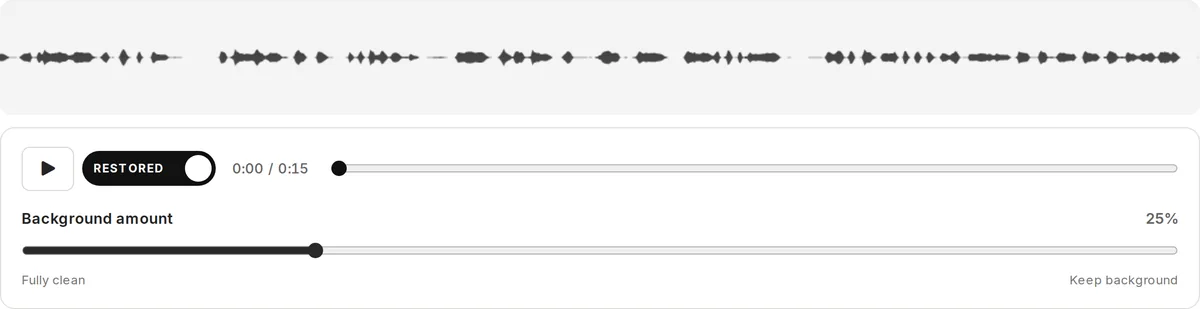
Press play, then switch between Original and Restored. Your place stays the same.
“And today we are here with Plastic Punch, picking rubbish, plastics to protect the ocean. You know, the ocean is life to many aquatic animals. It also serves many purposes for human beings, for refreshment, for recreation and a whole lot.”
A volunteer at a beach cleanup in Ghana, July 2024. Recording by Esthee2010, CC BY-SA 4.0. Restored October 19, 2026 with Diffio 4.5 Pro. Source and license
Noise that comes out of your recording
Diffio is built for recorded speech, so it listens for the voice and treats everything else as background. That covers most of what ends up under an interview:
- Air conditioning, fans and hum. Steady sound from HVAC, computer fans, refrigerators and electrical hum. The space station sample above is a small room full of fans.
- Traffic and street noise. Cars, buses, horns and the general wash of a city sidewalk, like the Denver street sample.
- Wind and surf. Wind on the microphone and waves behind the speaker, like the beach cleanup interview.
- Crowds and chatter. Voices and clattering dishes in a diner or café, or a busy conference hallway. The diner sample was recorded during a hurricane.
- Engines and vehicles. Train cabins, car interiors and running generators.
- Hiss and room tone. The noise floor of an inexpensive recorder, or a gain set high to catch a quiet speaker.
Diffio also reduces room echo and repairs supported clipping and distortion in the same pass. If echo is the bigger problem, see how to remove echo from audio.
What gets removed isn't thrown away. Diffio returns 2 tracks, restored speech and background, and the Background amount slider mixes them. Leave it at 0% for clean speech, or bring some of the room back when applause, laughter or ambience is part of the moment.
How to remove background noise from an audio recording
Upload the original
Drag in an audio file (MP3, WAV, M4A, AAC, FLAC or OGG) or a video (MP4, MOV, AVI, MKV or WebM). Use the least-processed version you have: a heavily compressed export leaves less of the voice to work with.
Choose a model and restore
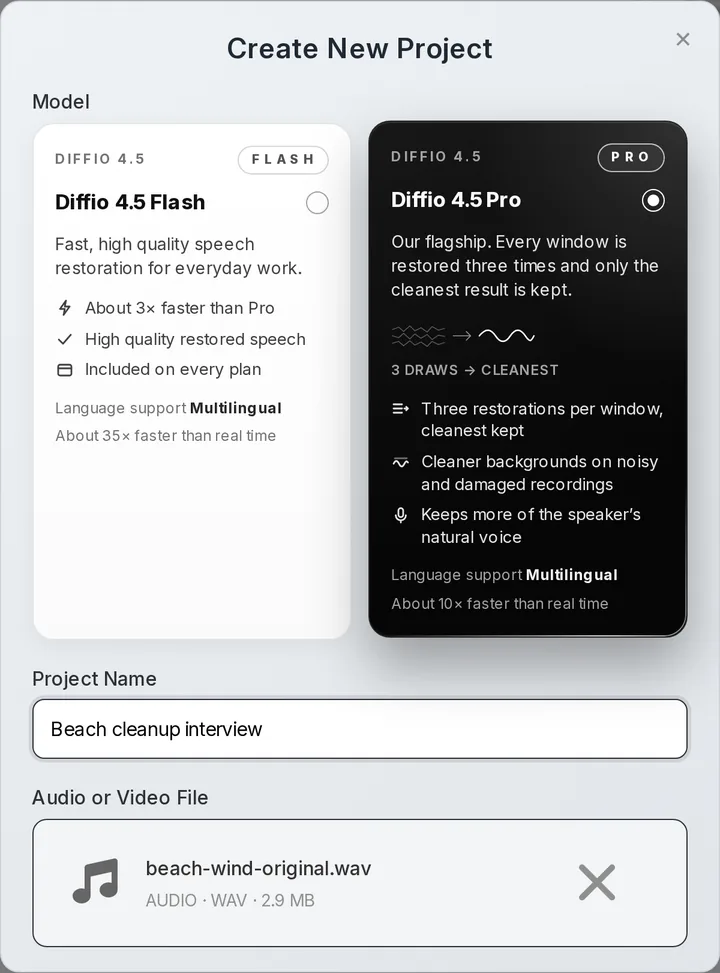
Diffio 4.5 Flash runs about 35× faster than real time and is on every plan. Diffio 4.5 Pro runs about 10× faster than real time and restores every window 3 times, keeping the cleanest result. It's included in Basic.
Compare, then download
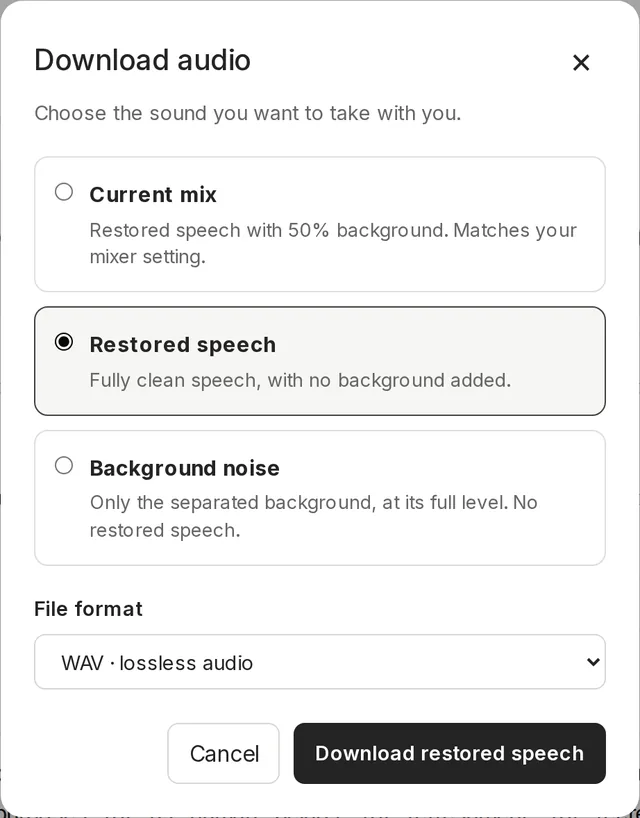
Play the result and switch between Original and Restored on the same playhead. Set the Background amount, then download the restored speech, the background or your mix as WAV or MP3. A video comes back as the same video with its soundtrack restored.
Interviews, episodes and lectures recorded somewhere loud
- Podcasters with remote guests on laptop mics, in kitchens and home offices. More on the podcast audio enhancer.
- Video producers and YouTubers who need the dialog restored without touching the picture. See removing background noise from video.
- Reporters and newsrooms with street interviews and press scrums recorded on location. See interview audio cleanup.
- Educators with recorded lectures where a projector fan or HVAC runs under every word. See the lecture audio enhancer.
- Developers adding noise removal to their product through the Diffio API, billed per second.
A manual noise reduction filter or speech restoration for your clip
Manual tools are good at their jobs. Here's how they compare on background noise in speech.
| Comparison | Audacity Noise Reduction | iZotope RX | Diffio |
|---|---|---|---|
| Good at | Steady hiss and hum, for free | Detailed manual repair with full control | Speech recorded in noisy places |
| How you work | Select noise on its own, capture a profile, apply it to the file | Choose and tune repair modules, edit the spectrogram by hand | Upload the file, choose Flash or Pro, compare the result |
| Changing noise like wind, traffic or voices | Hard, because one profile has to fit the whole file | Workable with time and skill | Removed as part of restoring the speech |
| Keeping some background | Set the reduction amount before applying | Per-module controls | Background amount slider after the restore |
| Video | Audio only; export and re-sync yourself | Audio only; re-sync in your editor | Upload the video, get the same video back |
| Runs on | Desktop app for Windows, macOS and Linux | Desktop app for Windows and macOS | A web browser, or the API |
| Cost | Free and open source | Paid software | Free plan to try; Basic is $8/month |
Pick Audacity for steady hiss when you'd rather work by hand for free, and iZotope RX for spectrogram-level repair when you have time to learn it. Adobe Podcast Enhance Speech is a free quick pass on short files (free tier files up to 30 minutes, per Adobe's plans page, October 2026). Krisp is for live calls. Diffio is for speech you've already recorded, when the noise keeps changing.
What it costs to restore your recordings
| Plan | Price | Restoration | What's included |
|---|---|---|---|
| Free | $0 | 3 uploads in total | Audio or video, Diffio 4.5 Flash, a 2-minute preview of each result, no downloads |
| Basic | $8/month | 6 hours a month | Flash and Pro models, video, full playback, downloads and export |
| Pro | $29/month | 30 hours a month | Everything in Basic, for people restoring recordings every week |
| API | Pay as you go | Billed per second | About $5 per hour on Flash and $10 per hour on Pro, $5 of free credit, 60-second minimum per job |
Every plan accepts files up to 90 minutes long and up to 2 GB. A 1-hour interview each week fits in Basic. Prices were checked on October 19, 2026; the pricing page has the current plans.
Questions about removing background noise
How do I remove background noise from an audio recording?
Upload the recording to Diffio, choose Diffio 4.5 Flash or Pro and compare the restored speech with the original in your browser. To do it by hand instead, Audacity's Noise Reduction effect works well on steady noise: select a few seconds where only the noise plays, capture it as a noise profile, then apply the effect to the whole file. Noise that keeps changing, like wind, traffic or other voices, is where a speech model helps most.
Can I remove background noise from audio for free?
Yes, to try it. The Free plan includes 3 uploads, audio or video, restored with Diffio 4.5 Flash, and you can play the first 2 minutes of each result. Full playback, downloads and the Pro model start with Basic at $8 per month. See plans and limits.
What kinds of background noise can Diffio remove?
Steady noise such as air conditioning, fans, hum and hiss, and changing noise such as traffic, wind, surf, crowds, engines and chatter. Music and crowd sound aren't deleted. They're separated into the background track, and the Background amount slider lets you mix them back in.
Does it remove background noise from video?
Yes. Upload MP4, MOV, AVI, MKV or WebM on any plan, including Free. Diffio restores the soundtrack and gives you back the same video with the picture untouched. More on removing background noise from video.
Will it also reduce echo?
Yes. Room echo and reverb are reduced in the same pass as the noise, and supported clipping and distortion are repaired. If the room was echoey, use Diffio 4.5 Pro. More on removing echo from audio.
When doesn't background noise removal work well?
Results depend on the recording. It's hardest when the noise is louder than the voice, when the speaker is far from the microphone, when 2 people talk over each other or when the speech itself is badly clipped. A quieter second voice, a few feet from the mic, can be treated as background. Raising Background amount brings it back. Diffio restores speech, so it isn't the tool for music recordings.
Does it work on live calls or as a microphone filter?
No. Diffio works on recordings after they're made, so it fits post-production rather than a meeting. Krisp is built for live calls. Diffio is for the interview, episode or lecture you already recorded.
Which files can I upload, and how long can they be?
Audio in MP3, WAV, M4A, AAC, FLAC or OGG, and video in MP4, MOV, AVI, MKV or WebM. Each file can be up to 90 minutes long and up to 2 GB on every plan. Speech in English, French, German, Spanish and Portuguese has been validated, and both models are multilingual.
Should I use Flash or Pro for a noisy recording?
Start with Diffio 4.5 Flash if the noise is mild. It's about 3× faster than Pro and on every plan. Use Diffio 4.5 Pro for loud or changing noise, since keeping the cleanest of 3 restorations matters most there. The Pro model is included in Basic, so you don't need the Pro plan to use it.
For the take you can't do over
Upload your toughest clip and hear the first 2 minutes restored. Results depend on the recording, which is why the free preview exists.
Where the samples come from
- Wind and surf: "Ocean pollution in Ghana" by Esthee2010, CC BY-SA 4.0.
- Diner chatter: "When a Hurricane Strikes, Weather the Storm With Waffles" by VOA News, public domain.
- Street noise: "Jeff-Walkabout-Denver" by kerouacsamerica on Freesound, CC BY 3.0. Left channel only: the right channel is the left with its polarity flipped.
- Fans and air handling: "Crew Quarters Tour Inside the Space Station" by NASA Johnson, public domain.
Each was excerpted and restored once with Diffio 4.5 Pro, with one fixed volume change per track and no other processing. The beach excerpt and its results are shared under CC BY-SA 4.0, like the original. No one recorded is a Diffio customer or endorses Diffio. Full credits and the sample record list the exact excerpts.