The test
Tested on the same 59 recordings
All 59 recordings
Averages over 59 clips; thin lines are 95% intervals.
Show the numbers, including estimated speaker similarity
| Tool | Quality gain (SCOREQ) | Word error rate | Estimated speaker similarity |
|---|---|---|---|
| Diffio 4.7 Flash | +2.3495% interval 2.17 to 2.51 | 3.9%95% interval 3.0% to 5.0% | 0.6595% interval 0.61 to 0.68 |
| Diffio 4.7 Pro | +2.3295% interval 2.15 to 2.49 | 4.1%95% interval 3.1% to 5.3% | 0.6595% interval 0.62 to 0.69 |
| Descript Studio Sound | +0.4695% interval 0.39 to 0.53 | 22.6%95% interval 16.6% to 28.9% | 0.7795% interval 0.74 to 0.80 |
| Original recording | No processing (average SCOREQ 2.31) | 13.2%95% interval 9.6% to 17.3% | 0.9295% interval 0.92 to 0.93 |
Averages over 59 clips of real recordings, run November 3, 2026 (other tools October 22). A higher SCOREQ gain and a lower word error rate are better. Estimated speaker similarity is an estimate, from the noisy original and the restored file alone, of how closely the restored voice matches the speaker (1 means identical). It replaces the ECAPA similarity to the noisy original, which read too low on damaged input. An untouched original scores about 0.92, so it measures how close the voice stays, not how much was cleaned. How it is estimated. Diffio's results are Diffio 4.7, rendered for this test on November 3, 2026 from its released model on Diffio's own GPUs with the same processing as the app (customer restorations run on Diffio's Mac mini fleet); the other tools ran on October 22, 2026.
Diffio is not affiliated with or endorsed by Descript. Product names are trademarks of their owners.
What the test found, and how each tool ran
The same 59 real recordings through every tool, each in its strongest speech cleanup mode at default amounts.
Diffio ran Descript Studio Sound and its own two models on the same 59 real recordings (test run November 3, 2026; other tools October 22), each in its strongest speech cleanup mode at default amounts. Diffio 4.7 raised the SCOREQ speech quality score by 2.34 (Flash) and 2.32 (Pro) on average, against 0.46 for Descript Studio Sound. Clip by clip on SCOREQ, Descript Studio Sound scored higher than Diffio 4.7 Pro on 0 of 59 clips.
Where Diffio did not win: On narration over music (1 clip), Descript Studio Sound (5.0%) had a lower word error rate than Diffio 4.7 Pro (6.3%).
Scores are model predictions, not a human listening test, and Diffio ran the test. The full method and every clip are on the results page.
Averages over all 59 clips. A higher quality gain (SCOREQ) and a lower word error rate are better; the untouched recordings had a 13.2% word error rate.
- Diffio 4.7 Flash (1st of 3 on quality gain): Released Diffio 4.7 weights, Flash sampler, run on Diffio's own GPUs with production's leveling, transcript and output steps; restored speech only. MP3 192 kb/s.
- Diffio 4.7 Pro (2nd of 3 on quality gain): Released Diffio 4.7 weights, Pro sampler, run on Diffio's own GPUs with production's leveling, transcript and output steps; restored speech only. MP3 192 kb/s.
- Descript Studio Sound (3rd of 3 on quality gain): API, Studio Sound at default intensity applied by an Underlord edit, nothing else changed. Returns AAC 160 kb/s.
What is Studio Sound in Descript?
An effect inside Descript
Studio Sound is Descript's voice enhancement effect: it reduces background noise, echo and other distractions in spoken audio, with an intensity slider for how much enhancement to apply. It works at the file level inside a Descript project, so it applies everywhere that file appears, and it needs an internet connection.
Is Descript Studio Sound free?
Limited on Free
Only in limited form. Descript's Free plan includes 60 media minutes a month, 100 AI credits once, limited Studio Sound, watermarked 720p exports, and Descript doesn't publish how much Studio Sound the Free plan allows. Full Studio Sound comes with the paid plans, from $24 a month ($16 billed yearly) on Hobbyist, which also lifts Free's 1 GB file limit.
How the Descript API changes the comparison
API: an agent edit, then publish
Descript now documents an API, so Studio Sound is not limited to clicking inside the editor. Current first-party documentation describes direct HTTP and API-token access plus CLI and Zapier pathways. Studio Sound is applied by an Underlord agent edit followed by a publish job, so it works as a multi-step project workflow rather than a single enhance call with settings.
Pricing
How much does Studio Sound cost?
Studio Sound has no separate price: it comes with Descript's paid plans (see Descript pricing) and is limited on Free.
Read the full answer
Descript lists Hobbyist at $24 monthly or $16 with annual billing, Creator at $35 monthly or $24 with annual billing, and Business at $65 monthly or $50 with annual billing, per person per month. Free is $0 and Enterprise is custom. Paid tiers include 10, 30 and 40 media hours and 400, 800 and 1,500 AI credits a month respectively. Each use draws on two allowances. Every uploaded or recorded hour uses an hour of media time (10, 30 or 40 hours a month on the paid plans), and each Studio Sound application uses AI credits based on the file's length, up to 30 credits per file.
Used to its full allowance, Hobbyist works out to about $2.40 per hour of audio ($1.60 billed yearly) and Creator to about $1.17 ($0.80 yearly). Descript does not publish a per-minute credit rate for Studio Sound. See the full Descript pricing breakdown or compare cost per hour across six tools. Looking to replace Descript itself? See Descript alternatives, editors and audio cleaners both. Comparing Descript with other tools? See Adobe Podcast vs Descript and Descript vs Auphonic.
Prices in US dollars. Check Descript's current pricing before purchasing.
Each tool's cheapest published plan that covers 5 hours a month, billed month to month; Diffio Basic is $8 a month for 6 hours. Cost per hour at 1, 5 and 20 hours for six tools
All 3 plans and prices
| Plan | Billing | Price (USD) | Hours included | Per hour, fully used |
|---|---|---|---|---|
| Hobbyist | Monthly subscription | $24 per person a month $16 per person a month billed yearly | 10 hours | $2.40 |
| Creator | Monthly subscription | $35 per person a month $24 per person a month billed yearly | 30 hours | $1.17 |
| Business | Monthly subscription | $65 per person a month $50 per person a month billed yearly | 40 hours | $1.63 |
Diffio plans: Free: 3 uploads · Basic $8 a month · API $5 an hour
Diffio plans: Free is 3 uploads in total with a 2-minute preview of each result. Basic ($8 a month) includes 6 hours a month and Pro ($29 a month) 30 hours, with full playback and downloads, for audio or video files up to 2 GB and 90 minutes. The API is billed per second at $5 an hour (Diffio 4.7 Flash) or $10 (Diffio 4.7 Pro), with a $5 starting credit. Diffio pricing · API pricing
How Studio Sound usage is counted
Descript offers a Free tier with limited Studio Sound access alongside monthly and annual paid choices. Free includes 60 media minutes each month and 100 AI credits as a one-time allocation; paid plans include monthly media-minute and AI-credit allocations. The monthly allocations do not roll over, and top-ups are available on Creator and Business.
Manual Studio Sound use scales with the length of the job or file rather than a fixed credit charge for every use. Descript's documentation states a maximum of 30 AI credits per file or tool application. Check Descript's official pricing and usage documentation for current allowances because plan details can change.
What Descript does well
Descript combines recording, transcript-based editing, audio and video production and AI-assisted tools in one suite.
Transcript-based production
Edit spoken audio and video through its transcript alongside recording and multitrack tools.
Studio Sound inside a full editor
Studio Sound reduces background noise and echo, with an intensity control for the effect.
Broader video workflow
Descript includes picture editing, captions, clips, stock media and publishing-oriented tools.
Current automation options
Its API documents direct HTTP and token access, CLI and Zapier pathways and workflows that can apply Studio Sound.
Where Descript falls short for a focused restoration job
Restoration lives inside a wider suite
A speech-restoration-only job still sits within Descript's recording, transcript, editing and production environment.
Two usage pools apply
Media time and AI credits are tracked separately, and manual Studio Sound use consumes credits based on job or file length.
Manual Studio Sound has a per-file cap
Current documentation states a maximum charge of 30 AI credits per file or tool application.
Studio Sound through the API is an agent edit
The API applies Studio Sound by asking Underlord to edit a project, then publishing it to get the audio back; there is no direct enhance endpoint or intensity setting.
Why users switch to Diffio for speech restoration
Damaged speech
Your source speech is compromised by supported noise, reverb or echo, or clipping or distortion.
A focused restore workflow
You want a focused upload-and-restore experience rather than a full production suite.
A restoration API
You need a developer API specifically for speech restoration.
Speech in video files
You want to restore the speech soundtrack of a supported video file without editing the picture.
Compared
Diffio vs Descript Studio Sound by workflow
| Need | Diffio | Descript Studio Sound |
|---|---|---|
| Primary job | Restore damaged speech | Edit in a full suite |
| Restoration scope | Noise, echo, clipping | Noise and echo, intensity slider |
| Editing and production | – No editor | ✓ Transcript editing |
| Automation | Restoration API | API via agent edits |
Show all 8 rows
| Need | Diffio | Descript Studio Sound |
|---|---|---|
| Primary job | Restore compromised speech | Edit and produce audio and video in the broader Descript suite |
| Restoration scope | Supported noise, reverb or echo and clipping or distortion cases | Studio Sound reduces background noise and echo with adjustable intensity |
| Editing and production | Focused restoration rather than a full editing suite | Transcript-based editing, recording, multitrack production, show notes and audio and video editing |
| Automation | Separate metered developer API for speech restoration | API with direct HTTP, API tokens, CLI and Zapier pathways; Underlord agent edits can apply Studio Sound |
| Web plan model | 3 uploads on Free; monthly minute allowances on Basic and Pro subscriptions | Free and paid plan choices; Free includes monthly media minutes and a one-time AI-credit allocation, while paid plans include monthly media minutes and AI-credit allocations |
| Video | Diffio restores the speech soundtrack of supported video files on every plan; Diffio does not edit picture | Broad video-picture editing and production workflows |
| Best fit | Focused degraded-speech restoration through a simple web or API route | A wider recording, editing and production suite |
| Our 59-clip test (test run November 3, 2026; other tools October 22) | Diffio 4.7 Flash: SCOREQ +2.34 on average, word error rate 3.9%; Diffio 4.7 Pro: SCOREQ +2.32 on average, word error rate 4.1%. Diffio ran the test; scores are model predictions, not a human listening study. Method and every clip. | Descript Studio Sound: SCOREQ +0.46 on average, word error rate 22.6%, on the same recordings. |
How it works
How Diffio restores a recording
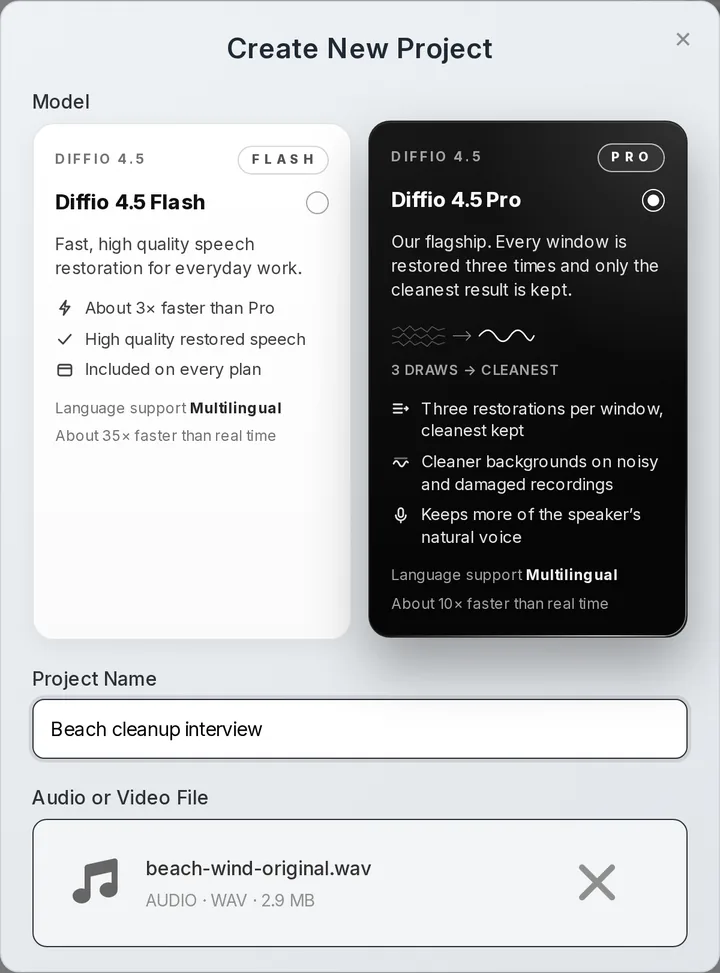
Upload what you recorded
Audio or video, up to 2 GB and 90 minutes per file.
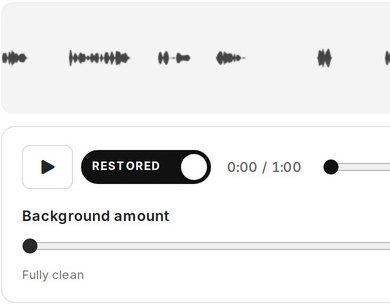
Compare on one playhead
Switch between the original and the restored speech while it plays.
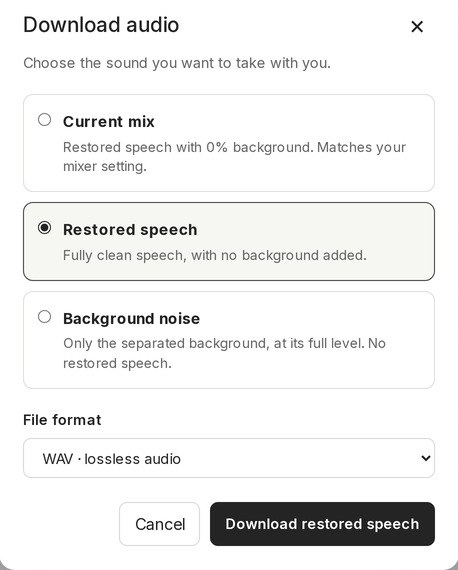
Download what you need
Paid plans download the speech, the background as its own track, or the full video.
- Diffio 4.7 FlashEvery plan, including Free
- Diffio 4.7 ProPaid plans, more model work per step
Questions
Descript Studio Sound questions
What is Studio Sound in Descript?
Studio Sound is Descript's voice enhancement effect: it reduces background noise and echo in spoken audio, with an intensity slider, inside the Descript editor.
Is Descript Studio Sound free?
Only in a limited form on the Free plan; full Studio Sound needs a paid plan. What Free includes is under Is Descript Studio Sound free? above.
How much does Descript Studio Sound cost?
Studio Sound has no separate price: it comes with Descript's paid plans, from $24 a month ($16 billed yearly) on Hobbyist, and is limited on Free. Each use draws on media time and on AI credits based on the file's length, up to 30 credits per file.
Can I use Studio Sound through the Descript API?
Yes, indirectly: it is an agent edit of a Descript project rather than a dedicated enhance call. How that works is under Where Descript falls short.
1 more question
Is there a Descript Studio Sound alternative?
Diffio restores damaged recorded speech in a browser or through an API, without a full editor. Descript remains the better pick if you edit audio and video by transcript.
Sources
Vendor pages and when we checked them
Vendor prices, allowances and Studio Sound credit rules checked November 10, 2026. API descriptions come from Descript's own API pages (last reviewed August 25, 2026). Sources: Descript's first-party API help, API overview, media minutes and AI credits guide, September 2025 changelog, current pricing page, and Studio Sound guide.