Two kinds
Two kinds of Descript alternative
Replace the editor
Editors that replace Descript
You record, cut and publish in Descript and want another app for all of it. Prices and plans from each vendor's own pages.
Riverside
Records remote guests on separate tracks, then edits by transcript, with Magic Audio cleanup in the same app.
Choose it for Recording remote guests and editing in one place.
Skip it if You want a free plan; there is only a 14-day trial.
Riverside pricing · Riverside vs Diffio · checked November 13, 2026
DaVinci Resolve
A full desktop video editor with color, effects and Fairlight audio. The free version handles most 8-bit footage up to Ultra HD.
Choose it for A free, professional editor you install once.
Skip it if You want text-based editing for free; it comes with Studio.
DaVinci Resolve · checked November 13, 2026
Kapwing
A browser video editor with Trim with Transcript, subtitles, Clean Audio and a shared workspace.
Choose it for Quick edits and subtitles in a browser, with a team.
Skip it if You publish long videos on Free; exports stop at 4 minutes.
Kapwing pricing · checked November 13, 2026
CapCut
A desktop, web and phone editor with templates, auto captions and transcript-based editing.
Choose it for Short social videos with captions and templates.
Skip it if You need to know what Free covers; its pricing page says only "basic editing tools".
CapCut pricing · checked November 13, 2026
Adobe Premiere
Adobe's professional video editor, with Text-Based Editing from an automatic transcript and AI dialogue cleanup.
Choose it for Professional edits next to other Adobe apps.
Skip it if You want month-to-month billing; the listed price is an annual plan.
Premiere plans · checked November 13, 2026
Podcastle (now Async)
Remote recording, transcript-based audio editing and a video editor, with Magic Dust cleanup on paid plans.
Choose it for Podcasts recorded and edited by one creator.
Skip it if You want its cleanup on Free; Magic Dust is paid only.
Async pricing · Podcastle vs Diffio · checked November 10, 2026
Audacity
A free, open-source desktop audio editor. Its Noise Reduction learns a stretch of noise you select and reduces it.
Choose it for Free audio-only editing by hand.
Skip it if You edit video or want to cut by transcript.
Audacity Noise Reduction manual · checked November 3, 2026
Replace Studio Sound
Audio cleaners that work with any editor
You like your editor; the voices still sound bad. Quality gain is each tool's average in our test.
Diffio
+2.34 quality gain
Restores speech in audio and video files: background noise, room echo and some clipping. It doesn't edit.
Adobe Podcast
+1.87 quality gain
Enhance Speech in the browser. Free for audio files up to 30 minutes, 1 hour a day.
Cleanvoice
+1.89 quality gain
Cleanup plus automatic cuts of filler words, long pauses and mouth sounds.
Auphonic
+0.82 quality gain
Leveling, loudness and publishing, with noise and reverb reduction on the way.
ElevenLabs Voice Isolator
+0.79 quality gain
Pulls the voice out of noise, inside the ElevenLabs voice platform and its API.
For reference, Descript Studio Sound: +0.46 quality gain on the same recordings. Studio Sound, its price and the test
How it works
How Diffio restores a recording
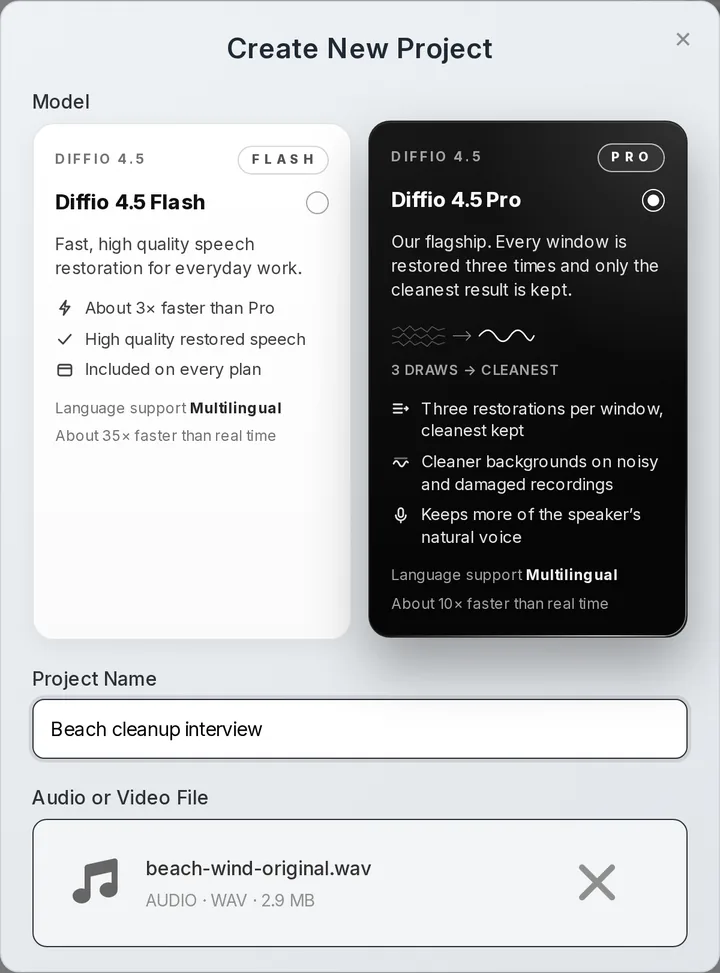
Upload what you recorded
Audio or video, up to 2 GB and 90 minutes per file.
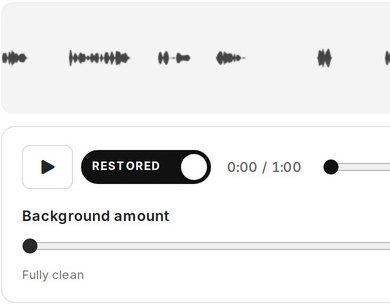
Compare on one playhead
Switch between the original and the restored speech while it plays.
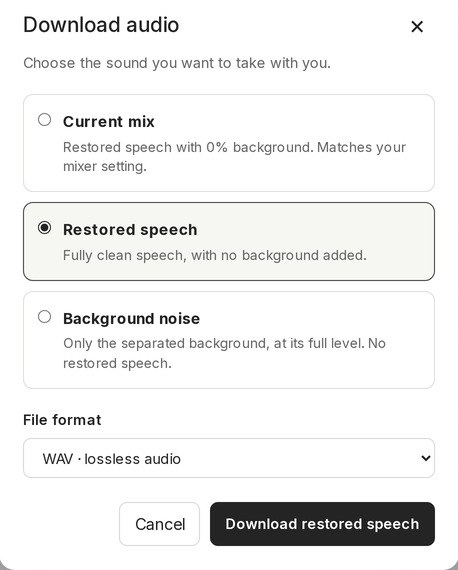
Download what you need
Paid plans download the speech, the background as its own track, or the full video.
- Diffio 4.7 FlashEvery plan, including Free
- Diffio 4.7 ProPaid plans, more model work per step
The test
Studio Sound and five cleaners on the same 59 recordings
Same 59 real recordings through every tool at default settings. Studio Sound raised the SCOREQ speech quality score by +0.46 on average; Diffio 4.7 by +2.34 (Flash) and +2.32 (Pro).
All 59 recordings
Averages over 59 clips; thin lines are 95% intervals. Studio Sound in dark gray. Method and every clip →
What the scores mean
Diffio ran the test. Scores are model predictions, not a human listening study.
Word error rate: Studio Sound 22.6%, Diffio 4.7 Flash 3.9%, against 13.2% for the untouched recordings. Diffio's restoration is guided by a transcript of the original, the same one used as the reference here, which favors Diffio on this measure.
Other tools did better than Diffio in places: on narration over music and on word errors in calls and echoey rooms. Every clip and where Diffio did not win are on the results page.
Compared
Descript alternatives side by side
Descript first, as the baseline. Prices in US dollars from each vendor's own pricing page.
| Tool | What it is | Text-based editing | Video | Free | Paid from | Best for |
|---|---|---|---|---|---|---|
| Descript | Editor, with Studio Sound | Yes | Yes, a full video editor | 60 media minutes a month, 100 AI credits once, limited Studio Sound, watermarked 720p exports | $24 a month (Hobbyist, 10 media hours) | Editing by transcript in one app |
| Riverside | Editor | Yes, unlimited on Pro | Yes, records up to 4K | No free plan; a 14-day free trial of Pro, Grow and Webinar | Pro $35 a month, or $24 a month billed yearly | Remote recording and editing |
| DaVinci Resolve | Editor | Studio only | Yes, a full desktop editor | A free version, up to Ultra HD at 60 fps | Studio $295 once (listed at $236 on sale) | Free professional editing |
| Kapwing | Editor | Yes, Trim with Transcript | Yes, in the browser | Watermarked exports up to 4 minutes, 720p | Pro $24 a month, or $16 a month billed yearly | Quick browser edits |
| CapCut | Editor | Yes, transcript-based editing | Yes, desktop, web and mobile | A Free plan with basic editing tools and templates | Pro $19.99 a month, or $179.99 a year | Short social videos |
| Adobe Premiere | Editor | Yes, Text-Based Editing | Yes, a full desktop editor | No free plan; a 7-day free trial | $22.99 a month on an annual plan, billed monthly | Professional editing in Adobe |
| Podcastle (now Async) | Editor | Yes, for audio | Yes, a video editor | A Free plan, without Magic Dust | Essentials $19.99 a month, or $11.99 billed yearly | Podcasts, recorded and edited |
| Diffio | Speech restoration only | No, it doesn't edit | Restores the soundtrack; doesn't edit the picture | 3 uploads, 2-minute previews | $8 a month (Basic, 6 hours) | Fixing damaged voices, any editor |
| Adobe Podcast | Speech enhancer | Not an editor here | Premium only | Audio only, 30 minutes a file, 1 hour a day | $19.99 a month (Firefly Pro) | Free cleanup of short audio |
| Auphonic | Leveling, loudness and cleanup | Not an editor here | Yes, every plan | 2 hours a month, with a jingle | $13 a month (9 hours) | Loudness and publishing |
| Cleanvoice | Cleanup and filler-word cuts | Not an editor here | Yes, video podcasts | 30-minute trial | $11 a month (10 hours) | Cutting filler words |
| ElevenLabs | Voice isolation | Not an editor here | Yes (MP4, MOV and more) | About 10 minutes a month, personal use | $6 a month (about 30 minutes) | Users of ElevenLabs voice tools |
Pricing
Cost per hour at 5 hours a month
Diffio Basic is $1.60/h at 5 hours a month; Descript Hobbyist is $4.80/h at 5 hours a month, and that price buys the whole editor, not only Studio Sound.
Each tool's cheapest published plan that covers 5 hours a month, billed month to month. The editors publish no hourly allowance for their cleanup, so they aren't charted. Cost per hour at 1, 5 and 20 hours
When to pick
Who should stay on Descript
Stay on Descript if
- You edit by transcriptDelete a word in the text and it leaves the audio and the video.
You make video, not only audio
Descript has picture editing, captions, clips, stock media and publishing tools.
- You want one app and one billRecording, editing and Studio Sound sit in the same project.
- Your recordings already sound fineThen the Studio Sound you already pay for may be all you need.
Add an audio cleaner if
- The voice itself is damagedTraffic, wind, a room full of echo or a clipped mic.
You want the background on its own track
Diffio returns the restored speech and the background separately, with a slider to mix them.
- You process a lot of filesA metered API with SDKs and webhooks, billed per second.
- You don't use the editor muchPaying for a whole editor to clean voices costs more per hour.
Together
Use Diffio with Descript, or with any editor
Diffio sits before the edit: restore the file, then cut it wherever you like.
Descript alone
- Record or import
- Studio Sound
- Edit by transcript
- Export
Diffio, then Descript
- Upload to Diffio
- Download the restored WAV or MP4
- Edit in Descript
- Export
Diffio, then any editor
- Upload audio or video
- Compare on one playhead
- Download
- Edit in your editor
Questions
Descript alternatives questions
What is the best Descript alternative?
It depends on what you use Descript for. To record remote guests and edit in one app, Riverside. For a free professional editor, DaVinci Resolve. For quick edits in a browser, Kapwing or CapCut; for professional work in Adobe, Premiere. If you only want the voices to sound better, keep your editor and add an audio cleaner such as Diffio, Adobe Podcast, Cleanvoice or Auphonic.
Is there a free Descript alternative?
DaVinci Resolve has a free version, and Audacity is free and open source. CapCut and Kapwing have Free plans; Kapwing's exports carry a watermark and stop at 4 minutes. Riverside has no free plan, only a 14-day trial. For cleanup only, Adobe Podcast Free takes audio only, one file at a time, up to 30 minutes and 500 MB per file, 1 hour a day, and Auphonic Free includes 2 processed hours a month with a jingle. Diffio Free is a trial: 3 uploads with a 2-minute preview of each result.
Does Diffio edit video?
No. Diffio restores the speech in audio and video files. Upload an MP4 or MOV and you get the same video back with the soundtrack restored and the picture unchanged. Cutting, captions and timelines stay in your editor.
Can I use Diffio with Descript?
Yes. Restore the recording in Diffio, download the restored WAV or MP4, then import it into Descript and edit as usual. Try that file with Studio Sound off and on, and keep whichever sounds right.
Is Descript Studio Sound good?
It's convenient: one effect in the editor you already use, with an intensity slider. In our 59-recording test it raised the SCOREQ speech quality score by +0.46 on average, and Diffio 4.7 by +2.34, while Studio Sound changed the voice less. Diffio ran the test and the scores are model predictions. More on Studio Sound, its price and the test.
Is Diffio cheaper than Descript?
For cleaning voices, yes: Diffio Basic is $1.60/h at 5 hours a month, and Descript Hobbyist is $24 a month for 10 media hours. They buy different things, though: Descript's price includes the whole editor. Full plans are on Descript pricing and Diffio pricing.
Sources
Vendor facts from their own pages; scores from our own test, which Diffio ran.
Vendor pages and when we checked them
- Descript (checked November 10, 2026): Descript pricing, Media minutes and AI credits guide, Studio Sound guide, Descript API help
- Podcastle (checked November 10, 2026): Async pricing and plan comparison (podcastle.ai/pricing redirects here), Magic Dust AI audio enhancer
- Adobe Podcast (checked November 13, 2026): Adobe Podcast plans, Adobe Podcast features, Adobe Firefly plans, Adobe Podcast Premium plan change FAQ, Enhance Speech v2 announcement (Adobe community), Firefly Pro offer terms, Firefly Pro checkout (trial and prices)
- Auphonic (checked November 10, 2026): Auphonic pricing, credits and feature comparison, Auphonic features
- Cleanvoice (checked November 10, 2026): Cleanvoice pricing, Cleanvoice API documentation
- ElevenLabs (checked November 10, 2026): ElevenLabs pricing, Voice Isolator page and plan table, Voice Isolator documentation, ElevenLabs API pricing
- Riverside (editor plans) (checked November 13, 2026): Riverside pricing, Is Riverside free? (Riverside guide)
- DaVinci Resolve (checked November 13, 2026): DaVinci Resolve and Studio
- Kapwing (checked November 13, 2026): Kapwing pricing, Kapwing Trim with Transcript
- CapCut (checked November 13, 2026): CapCut pricing, CapCut transcript editing
- Adobe Premiere (checked November 13, 2026): Premiere plans, Premiere features
- Audacity (checked November 3, 2026): Audacity Noise Reduction manual, audacity/audacity on GitHub
Prices change, so check the vendor before you buy.
Diffio is not affiliated with or endorsed by Adobe, Descript, Auphonic, ElevenLabs or Cleanvoice. Product names are trademarks of their owners.