What it fixes
One pass on the whole soundtrack
Zoo keeper on a penguin tour, 0:14 to 0:23 Noise
Traffic, crowds and fans.
Noise in videoBeach interview in wind, below 150 Hz Wind
Gusts on the camera mic.
Wind noisePublic lecture in a hall, a 1.8-second pause Echo
Bare rooms and big halls.
Room echo
Gray is the original, black is Diffio 4.7 Flash. The same pass also fixes hum and hiss and clipped speech.
How it works
Enhance a video's audio in 3 steps
01 · Upload

Upload the video
The Kansas City street clip from the player, as an MP4.
02 · Compare


Play it with the picture
Switch between Original and Restored at the same moment.
03 · Download
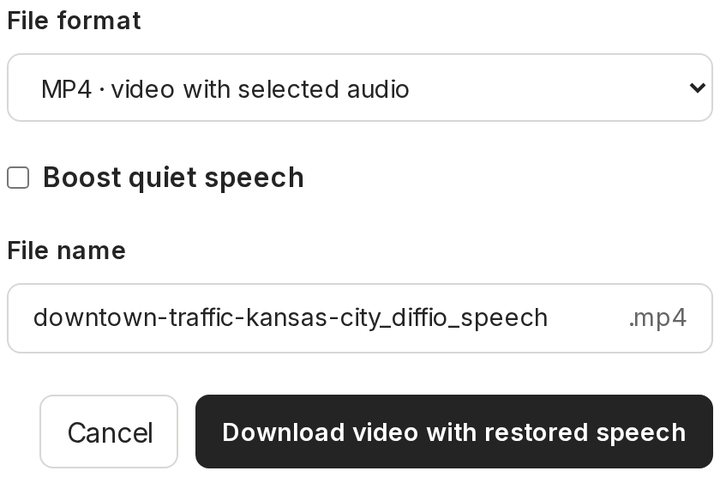

Download the MP4
The same picture with the enhanced speech, on a paid plan.
- Diffio 4.7 FlashEvery plan, including Free
- Diffio 4.7 ProPaid plans, more model work per step
Each step in full: formats, models and results
Upload the video
Drag in the file, or pick it from your phone's library. The camera original works best.
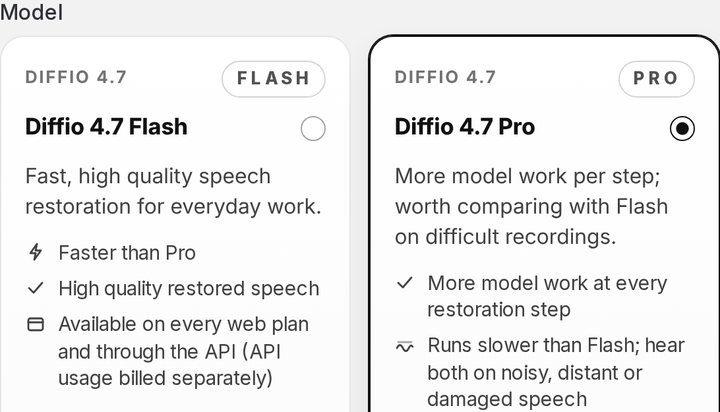
Choose Flash or Pro
Diffio 4.7 Flash runs about 30× faster than real time and is on every plan. Diffio 4.7 Pro runs about 10× faster, does more model work per step and comes with Basic.
Play it, then download
The result plays with the picture. Switch between Original and Restored, set the Background amount, then download the MP4, or the audio alone as WAV, MP3 or M4A.
With your editor
Premiere Pro, Final Cut, CapCut or straight from an iPhone
- 01 · ExportYour clipMP4 or MOV from the timeline, or the camera file
- 02 · EnhanceDiffioSpeech restored, background kept on its own track
- 03 · Re-importBack on the timelineSame length as the clip, so it lines up from the first frame
- Premiere Pro
- Final Cut Pro
- DaVinci Resolve
- CapCut
- iMovie
- iPhone Photos
| Route | You get back | In your editor |
|---|---|---|
| Whole video back | An MP4 with the same picture and the enhanced speech | Replace the clip on your timeline |
| Audio only back | A WAV, MP3 or M4A as long as the clip | Lay it under the clip from its first frame and mute the original |
On an iPhone, and what happens to the picture
Open diffio.ai in Safari, choose the video from your library and play the result there. iPhones and most cameras record H.264 or HEVC, and Diffio copies that picture into the MP4 frame for frame; other codecs are re-encoded to H.264. Downloads are on paid plans.
Tested
The three videos above in our speech enhancer test
2.474.67Average speech quality (SCOREQ, 1 to 5), original to Diffio 4.7 Pro
| Video | Original | Best other tool | Diffio 4.7 Pro |
|---|---|---|---|
| Wind: Outdoor interview, California | 3.15 | 4.62 Adobe Podcast | 4.70 |
| Traffic: Downtown street, Kansas City | 2.93 | 4.46 Adobe Podcast | 4.49 |
| Machines: Fish hatchery, Colorado | 1.32 | 4.64 Adobe Podcast | 4.82 |
SCOREQ is a model's prediction of speech quality, not a listening test. Diffio ran the test on 59 real recordings against Adobe Podcast, Cleanvoice, Auphonic, ElevenLabs and Descript Studio Sound. Test run: Diffio 4.7 on November 3, 2026, the other tools on October 22, 2026. Method and every clip.
Every tool on these videos, and the whole test
| Recording | 4.7 Flash | 4.7 Pro | Best other tool |
|---|---|---|---|
| Fish and Wildlife Service interview in windWind and traffic | +1.55 | +1.55 | +1.47Adobe Podcast |
| Streetcar project on a busy streetWind and traffic | +1.55 | +1.57 | +1.53Adobe Podcast |
| Fish hatchery machineryHum, machines and distortion | +3.47 | +3.50 | +3.32Adobe Podcast |
| Average of these 3 | +2.19 | +2.20 | +2.11Adobe Podcast |
Each figure is one recording's gain over its own original. Single clips vary, so treat a row as an example and the group average below as the result.
All 6 tools, full groups: Wind and traffic (7 clips), Hum, machines and distortion (4 clips)
Wind and traffic: 7 clips
Averages over 7 clips; thin lines are 95% intervals.
Hum, machines and distortion: 4 clips
Averages over 4 clips; thin lines are 95% intervals.
Show the numbers, including estimated speaker similarity
| Tool | Quality gain (SCOREQ) | Word error rate | Estimated speaker similarity |
|---|---|---|---|
| Diffio 4.7 Flash | +2.1395% interval 1.59 to 2.68 | 6.0%95% interval 2.7% to 9.7% | 0.7595% interval 0.64 to 0.83 |
| Diffio 4.7 Pro | +2.1195% interval 1.57 to 2.64 | 4.9%95% interval 2.4% to 7.5% | 0.7695% interval 0.64 to 0.84 |
| Adobe Podcast | +1.9695% interval 1.50 to 2.38 | 12.6%95% interval 5.5% to 23.0% | 0.6695% interval 0.55 to 0.76 |
| Cleanvoice | +1.8495% interval 1.27 to 2.37 | 17.4%95% interval 5.0% to 38.4% | 0.6395% interval 0.51 to 0.74 |
| Auphonic | +1.6095% interval 1.29 to 1.88 | 9.2%95% interval 4.8% to 13.9% | 0.8295% interval 0.71 to 0.90 |
| ElevenLabs | +1.5595% interval 1.05 to 2.07 | 22.7%95% interval 5.3% to 52.2% | 0.8195% interval 0.68 to 0.90 |
| Descript Studio Sound | +0.4695% interval 0.33 to 0.64 | 11.7%95% interval 5.4% to 20.7% | 0.9295% interval 0.90 to 0.93 |
| Original recording | No processing (average SCOREQ 2.43) | 13.6%95% interval 4.8% to 27.1% | 0.9395% interval 0.92 to 0.94 |
| Tool | Quality gain (SCOREQ) | Word error rate | Estimated speaker similarity |
|---|---|---|---|
| Diffio 4.7 Flash | +1.9695% interval 1.03 to 3.01 | 4.3%95% interval 2.2% to 7.1% | 0.8295% interval 0.75 to 0.88 |
| Diffio 4.7 Pro | +1.9995% interval 1.09 to 3.03 | 4.7%95% interval 3.1% to 7.2% | 0.8295% interval 0.76 to 0.88 |
| Adobe Podcast | +1.9695% interval 1.30 to 2.87 | 7.0%95% interval 5.2% to 8.3% | 0.7195% interval 0.61 to 0.76 |
| Cleanvoice | +1.8895% interval 1.13 to 2.78 | 7.8%95% interval 6.4% to 9.2% | 0.7195% interval 0.61 to 0.78 |
| Auphonic | +1.7195% interval 1.00 to 2.43 | 7.0%95% interval 5.6% to 8.5% | 0.8495% interval 0.78 to 0.90 |
| ElevenLabs | +1.3295% interval 0.54 to 2.10 | 7.9%95% interval 3.5% to 12.3% | 0.8695% interval 0.82 to 0.90 |
| Descript Studio Sound | +0.4895% interval 0.31 to 0.64 | 6.2%95% interval 4.8% to 7.8% | 0.9195% interval 0.90 to 0.92 |
| Original recording | No processing (average SCOREQ 2.67) | 5.6%95% interval 3.7% to 7.6% | 0.9295% interval 0.90 to 0.92 |
Averages over 11 clips of real recordings, run November 3, 2026 (other tools October 22). A higher SCOREQ gain and a lower word error rate are better. Estimated speaker similarity is an estimate, from the noisy original and the restored file alone, of how closely the restored voice matches the speaker (1 means identical). It replaces the ECAPA similarity to the noisy original, which read too low on damaged input. An untouched original scores about 0.92, so it measures how close the voice stays, not how much was cleaned. How it is estimated. Diffio's results are Diffio 4.7, rendered for this test on November 3, 2026 from its released model on Diffio's own GPUs with the same processing as the app (customer restorations run on Diffio's Mac mini fleet); the other tools ran on October 22, 2026.
Diffio is not affiliated with or endorsed by Adobe, Descript, Auphonic, ElevenLabs or Cleanvoice. Product names are trademarks of their owners.
Plans
Free to try, then by the hour of video
Free
$0
Try Diffio on your own recordings.
- 3 uploads in total (not monthly), audio or video
- Preview the first 2 minutes of each result
- Diffio 4.7 Flash model
- No full playback, download or export
Basic
$8per month
For hobbyists and small teams.
- 6 hours (360 minutes) of audio or video a month
- Full playback, download and export
- Diffio 4.7 Flash and 4.7 Pro. Developer model docs
Pro
$29per month
For professionals and businesses.
- 30 hours (1,800 minutes) of audio or video a month
- Full playback, download and export
- Diffio 4.7 Flash and 4.7 Pro. Developer model docs
Diffio costs $1.60/h at 5 hours a month. A video counts by its length.
Questions
Questions about enhancing audio in video
What does an audio enhancer for video do?
It makes the speech in a video easier to hear. Diffio takes out background noise and wind, reduces room echo and hum, and repairs some clipped speech, all in one pass on the soundtrack. You get the same video back with the enhanced speech.
Is there a free audio enhancer for video?
Diffio is free to try. The Free plan includes 3 uploads in total, audio or video, enhanced with Diffio 4.7 Flash, and you can play the first 2 minutes of each result with the picture. Downloading the video starts with the Basic plan. See plans and limits.
Can AI enhance the voice in a video?
Yes. Diffio 4.7 Flash and Diffio 4.7 Pro are speech models: they find the voice in the soundtrack and restore it, and everything else goes to a separate background track. Both work best in English; other languages run, with varying quality.
Does it change the picture?
No. Diffio works on the soundtrack only: no upscaling, denoising or color changes. H.264 and HEVC pictures, which phones and most cameras record, are copied into the MP4 unchanged; other codecs are re-encoded to H.264.
Which video formats can I upload?
MP4, MOV, AVI, MKV or WebM video, 3GP or 3G2 phone recordings, or MP3, WAV, M4A, AAC, FLAC or OGG audio, up to 90 minutes and 2 GB per file on every plan, including Free.
4 more questions
How do I use it with Premiere Pro, Final Cut Pro or CapCut?
Export the clip, or use the original camera file, and upload it. Bring back the MP4 to replace the clip, or the WAV to lay under it. The audio runs the full length of the clip, so it lines up when both start on the same frame. For Final Cut Pro, see removing background noise in Final Cut Pro, step by step.
Does it work on iPhone videos?
Yes. Open diffio.ai in Safari on the iPhone and choose the video. iPhones record HEVC, so the picture comes back unchanged in the MP4. See supported browsers.
Can I keep some of the background sound?
Yes. The Background amount slider mixes the background back in, from fully clean to all of it, when the crowd or the street belongs in the shot. The video you download uses your mix.
Does it work on live video or streams?
No. Diffio enhances videos after they are recorded, so it fits editing, not a live call or stream.