Why it happens
Why sermon recordings sound distant
Sound familiar?
A sanctuary is built for singing. The hard walls and high ceiling that make a congregation sound full make a spoken sermon blur, and when the pastor steps away from the pulpit mic, the recording gets more room and less voice. Nobody did anything wrong; it’s the building.
Reverberant rooms
Hard walls and high ceilings keep each word sounding after it ends: reverb.
A mic that stays put while the preacher moves
A pulpit or lectern mic hears less voice and more room with every step away from it.
Recording the room instead of the desk
A phone or camera in the back row records the PA through the sanctuary, reverb and all.
A mix made for the pews
Levels set for the room can sound thin or uneven on a recording.
1 more: Older tapes
Older tapes
Cassette and reel recordings of sermons add wear on top of the room. See restoring old recordings.
Tested
Archived sermons in our speech enhancer test
- Diffio 4.7 Flash
- +2.41
- Diffio 4.7 Pro
- +2.36
- Best other tool: Cleanvoice
- +1.74
- Word errors, original → 4.7 Pro
- 16.4% → 3.2%
The result in words and the full chart
Average SCOREQ quality gain over the original on 29 archived sermons clips, higher is better. Test run: Diffio 4.7 on November 3, 2026, the other tools on October 22, 2026.
Across 29 archived sermons recorded in churches, Diffio 4.7 Flash raised speech quality by +2.41 and Pro by +2.36, against +1.74 for Cleanvoice, and word errors fell from 16.4% to 3.2% with Pro.
Archived sermons: 29 clips
Averages over 29 clips; thin lines are 95% intervals.
Show the numbers, including estimated speaker similarity
In our test's archived sermons group (29 clips), Diffio 4.7 Flash and Diffio 4.7 Pro raised the SCOREQ speech quality score by 2.41 and 2.36 on average, against 1.74 for Cleanvoice, the highest of the other tools. Diffio 4.7 Pro's word error rate was 3.2%, against 16.4% for the original recordings.
Diffio is not affiliated with or endorsed by Adobe, Descript, Auphonic, ElevenLabs or Cleanvoice. Product names are trademarks of their owners.
| Tool | Quality gain (SCOREQ) | Word error rate | Estimated speaker similarity |
|---|---|---|---|
| Diffio 4.7 Flash | +2.4195% interval 2.21 to 2.62 | 3.3%95% interval 2.3% to 4.4% | 0.5795% interval 0.53 to 0.61 |
| Diffio 4.7 Pro | +2.3695% interval 2.14 to 2.58 | 3.2%95% interval 2.2% to 4.2% | 0.5895% interval 0.53 to 0.62 |
| Adobe Podcast | +1.6895% interval 1.53 to 1.82 | 25.0%95% interval 17.3% to 33.4% | 0.5895% interval 0.54 to 0.61 |
| Cleanvoice | +1.7495% interval 1.53 to 1.94 | 18.5%95% interval 12.8% to 25.0% | 0.5895% interval 0.55 to 0.61 |
| Auphonic | +0.3695% interval 0.25 to 0.48 | 16.2%95% interval 11.0% to 21.9% | 0.8695% interval 0.83 to 0.88 |
| ElevenLabs | +0.3295% interval 0.18 to 0.49 | 20.9%95% interval 14.5% to 28.1% | 0.8295% interval 0.79 to 0.85 |
| Descript Studio Sound | +0.5395% interval 0.43 to 0.63 | 32.0%95% interval 21.6% to 42.8% | 0.6795% interval 0.65 to 0.70 |
| Original recording | No processing (average SCOREQ 2.29) | 16.4%95% interval 10.6% to 23.3% | 0.9295% interval 0.92 to 0.93 |
Averages over 29 clips of real recordings, run November 3, 2026 (other tools October 22). A higher SCOREQ gain and a lower word error rate are better. Estimated speaker similarity is an estimate, from the noisy original and the restored file alone, of how closely the restored voice matches the speaker (1 means identical). It replaces the ECAPA similarity to the noisy original, which read too low on damaged input. An untouched original scores about 0.92, so it measures how close the voice stays, not how much was cleaned. How it is estimated. Diffio's results are Diffio 4.7, rendered for this test on November 3, 2026 from its released model on Diffio's own GPUs with the same processing as the app (customer restorations run on Diffio's Mac mini fleet); the other tools ran on October 22, 2026.
What it does
What Diffio does with a sermon recording
Reduces church reverb
Reduces church reverb, so words stop running into each other. In a very live sanctuary some of the room remains, as in the samples above. More on removing echo and reverb.
Brings a distant voice forward
Brings a distant voice forward when the mic was across the room or the preacher stepped away from the pulpit.
Keeps the music out of the way
Worship songs, the organ and congregational singing aren’t restored as speech; they go to a separate background track. The Background amount slider mixes some back in if you want the room or the response.
Writes a transcript
Writes a transcript of every sermon, a starting point for sermon notes, a blog post or episode notes.
Worship music isn’t the target; a call and response stays in one track.
All the limits
Diffio restores speech, so it isn’t the tool for the worship set itself. A call and response, with 2 voices at once, stays together in one restored speech track. Results depend on the recording, so listen against the original before you post.
In the recording → Diffio 4.7 Flash or Pro → You download
In the recording
From the desk, a phone or the livestream
- The preaching
- The sanctuary ringing behind it
- Worship songs, the organ and congregational singing
Diffio 4.7 Flash or Pro
Reduces church reverb
- Brings a distant voice forward
- Leaves the music out of the restored speech
You download
The sermon, ready to post
- WAV, MP3 or M4A, or the same video
- Music and room on a background track, with a slider to mix some back
- A transcript for sermon notes
Sermon archive
Hear thousands of restored sermons
Voices For Christ: search thousands of sermons and play each as the original or the restored version.

Why listen there first
Voices For Christ is a free sermon archive on Diffio. It’s a good place to hear what restoration does to sermon recordings before you upload your own.
How it works
How to clean up a sermon recording
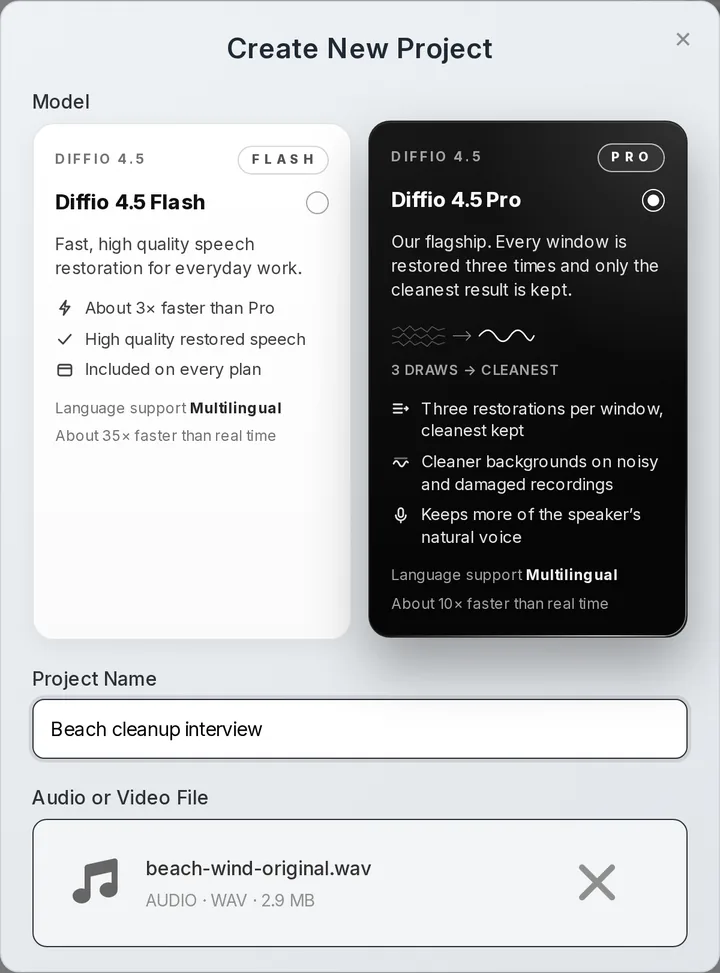
Upload what you recorded
Audio or video, up to 2 GB and 90 minutes per file.
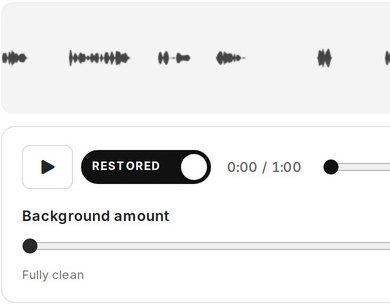
Compare on one playhead
Switch between the original and the restored speech while it plays.
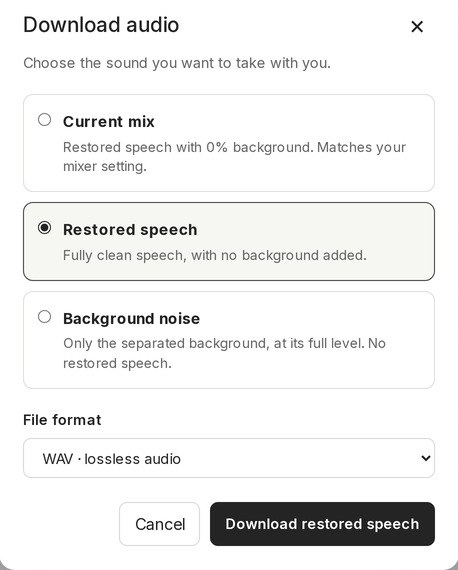
Download what you need
Paid plans download the speech, the background as its own track, or the full video.
- Diffio 4.7 FlashEvery plan, including Free
- Diffio 4.7 ProPaid plans, more model work per step
Each step in full: formats, models and results
Trim to the sermon
Trim to the sermon if the recording is the whole service. Each file can be up to 90 minutes and 2 GB, and the music isn’t what you’re restoring.
Upload the audio or the livestream video
Diffio takes MP3, WAV, M4A, AAC, FLAC and OGG audio, MP4, MOV, AVI, MKV and WebM video, and 3GP or 3G2 phone recordings. Video keeps its picture.
Choose Diffio 4.7 Pro
Choose Diffio 4.7 Pro for a reverberant sanctuary. Diffio 4.7 Flash is faster and on every plan, and the Pro model is included in Basic.
Compare
Compare the restored speech with the original on one playhead, and set how much of the room to keep with the Background amount slider.
Download
Download the restored audio as WAV, MP3 or M4A, or the same video with the restored speech, and post it to your website, podcast feed or video channel.
Next time
Record next Sunday’s sermon better
Record from the sound desk, not the room
A recorder or computer on the mixer’s record or aux output gets the pastor’s mic before the sanctuary adds its reverb.
- Put a headset or lavalier mic on the preacher
It moves with them, so the level holds when they step away from the pulpit.
Give the recording its own mix
If your desk allows it, the pastor’s mic up and the room and instrument mics down.
- Leave headroom for the loudest moment
A sermon that builds toward the end can clip a recording set for the opening.
Keep a backup
A phone recording near the pulpit has saved more than one Sunday when the desk recorder didn’t run.
Plans
What it costs to clean up sermon audio
Free
$0
Try Diffio on your own recordings.
- 3 uploads in total (not monthly), audio or video
- Preview the first 2 minutes of each result
- Diffio 4.7 Flash model
- No full playback, download or export
Basic
$8per month
For hobbyists and small teams.
- 6 hours (360 minutes) of audio or video a month
- Full playback, download and export
- Diffio 4.7 Flash and 4.7 Pro. Developer model docs
Pro
$29per month
For professionals and businesses.
- 30 hours (1,800 minutes) of audio or video a month
- Full playback, download and export
- Diffio 4.7 Flash and 4.7 Pro. Developer model docs
- Files up to 90 min · 2 GB, every plan
- API from $5/h · $5 free credit
- Every plan detail
Questions
Questions about sermon and church audio
What equipment is used to record sermon audio?
Most churches record from the sound desk: the pastor’s headset, lavalier or pulpit mic goes into the mixer, and a recorder, an audio interface on a computer or the mixer’s own USB recording captures it. A phone in the room works as a backup, but it records the reverb too.
What app can I use to record church sermons?
Any recorder that captures the sound desk’s output works. Audacity on a computer is free, many digital mixers record straight to USB and a phone voice memo app works in a pinch. Diffio isn’t a recording app; it cleans up the recording afterwards.
How do I make a sermon recording sound better?
Record from the desk with the mic close to the preacher, then restore the file. Upload it to Diffio, choose Diffio 4.7 Pro for an echoey sanctuary, compare the restored speech with the original and download it on a paid plan.
Can Diffio remove the echo from a sermon recorded in a big church?
It reduces it. Words stop running together and the preacher sounds closer. In a very live sanctuary some reverb remains, as in the samples on this page, so compare the result with the original before you publish.
5 more questions
What happens to the worship music and singing?
Diffio restores speech, so music and singing go to a separate background track rather than being restored. Use the Background amount slider to bring some back, or keep the original audio for the worship set.
Can I clean up our livestream video?
Yes. Upload the MP4 or MOV and Diffio restores the speech in the soundtrack while the picture stays as it was. A full service longer than 90 minutes needs to be trimmed or split first.
How do I start a church podcast from sermon recordings?
Trim each recording to the sermon, restore it with Diffio, download the MP3 and upload it to your podcast host as an episode. The transcript makes a starting point for the episode notes. The podcast audio enhancer page covers podcast audio in more detail.
Can Diffio restore old sermon tapes?
Yes, once they’re digitized. Upload the transfer like any other recording. See restoring old recordings for tapes and archives.
Is it free to try?
Yes. The Free plan includes 3 uploads, audio or video, with a 2-minute preview of each result on Diffio 4.7 Flash. Full playback, downloads and the Pro model start with Basic at $8 per month. See plans and limits.