Running an unattended Mac mini fleet: a dedicated worker host, macOS 27 auto-login and deploy settings
How Diffio keeps its Mac mini inference fleet running unattended: a host that runs only the worker, disk cleanup, auto-login on macOS 27 with /etc/kcpassword, full disk access over SSH, Screen Sharing and deploy settings.
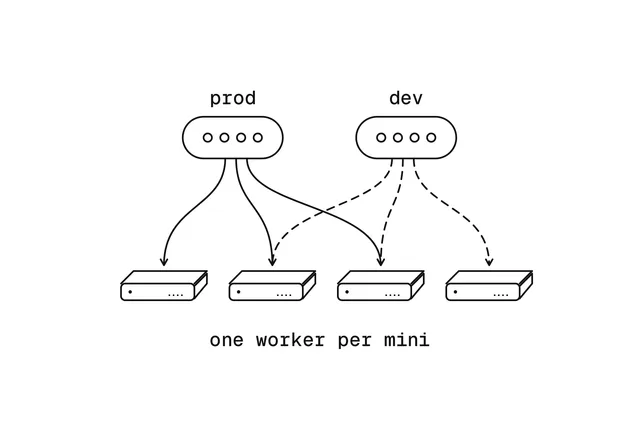
Diffio 4.5 restores speech on a fleet of Mac minis (M4 Pro, 24 GB of unified memory). Each mini runs one worker, which can serve our production environment, our dev environment or both. This post covers the host side of that fleet: keeping each mini a dedicated worker host with free disk, logging it in without a person, the permissions set once in System Settings, and the host and deploy settings that keep it serving through reboots, crashes and failed deploys. How the worker overlaps downloads, encoding and uploads with inference is in Mac mini serving: overlapping I/O with inference, not batching, raised throughput.
Running a Mac mini inference host unattended
- Worker only
- Console user
- Permissions
- Survive failures
What each step involves
What this post covers, in order
- Worker only
- No desktop apps; the worker warns on stray processes, swap and low disk
- Console user
- Auto-login, with /etc/kcpassword written by hand on macOS 27
- Permissions
- Full disk access over SSH and Screen Sharing, set in System Settings
- Survive failures
- LaunchDaemon, KeepAlive, smoke restore and rolling deploys
A fleet mini runs the worker and nothing else
One of our minis had also served as a desktop and a research machine: it ran the ChatGPT desktop app, started at login by a launch agent, Chrome, a research restore process left from a previous day, and its research checkouts. It had 4.4 GB of swap in use; after the cleanup, 0.5 GB. Any desktop working set competes directly with the model and the running jobs.
The worker checks every minute for processes of its user outside macOS and its own folder, launch agents and daemons other than its own and Tailscale's, and active swapping, and reports any it finds as a warning in our analytics.
Why the worker warns on the swap-out rate, and what the deploy script checks
Swap occupancy was the first signal and proved too coarse, since macOS leaves cold pages in swap long after the pressure that put them there; the worker now warns on the swap-out rate, more than 256 MB written since its previous check. The deploy script refuses a mini that fails the process and launch-item checks, and checks swap only after the old worker has exited, since the old worker's swap is freed with it; if heavy swap remains, it restarts the previous release.
Desktop software comes back on its own: after a reboot, macOS reopened Chrome from the saved login session, and Chrome reinstalled three Google updater launch agents. defaults write com.apple.loginwindow TALLogoutSavesState -bool false stops apps from reopening at login.
The worker sweeps its work and temporary directories at startup, alerts below 20 GB free without refusing jobs, and deploys keep two releases
Each job writes into its own folder under the worker's work directory, removed when the job completes or fails. A crash or power loss mid-job leaves that folder behind, so the worker empties its work directory when it starts, when nothing can be running. Temporary files escaped that rule: one mini's per-user temporary directory held 14 GB of compiled Core ML models (.mlmodelc directories) left by model builds and research runs.
How compiled Core ML models and temporary files stay inside the sweep
Core ML compiles a model package into a temporary location. Our loader copies each compiled model next to its package, so compiling happens once per machine, and it now deletes the temporary copy as soon as it has its own. The worker also points TMPDIR at a folder inside its work directory, for itself and every process it starts, so the startup sweep covers Python's and ffmpeg's temporary files.
A release's code is 6.6 MB, but the weights bundle (the checkpoints, the speech-encoder and codec models, and the converted Core ML and MLX copies) is 24 GB, so a deploy keeps only the new release and the previous one, the rollback target, and deletes weight bundles neither uses. Seeding a bundle from a folder already on the mini uses APFS copy-on-write clones (cp -c), which share blocks until a file changes.
- 14 GBcompiled Core ML models left in one mini's temporary directory
- 24 GBa release's weights bundle, against 6.6 MB of code
- 20 GBfree space below which the worker warns
- 5 GBfree space below which it reports an error
Below 20 GB free on the work volume (disk_alert_gb in the worker's configuration) the worker reports a warning to our analytics, and below 5 GB an error, repeated while it lasts; a deploy prints the warning and goes ahead. A job that actually runs out of space fails on its own. The worker used to offer no slots below the threshold, which would have taken a mini out of service with 20 GB still free.
The Neural Engine's compiled-model cache, which SSH cannot measure
/Library/Caches/com.apple.aned, where the Neural Engine service keeps the models it has compiled in a folder per macOS build, stays Operation not permitted over SSH even with full disk access and sudo, so du cannot measure it. On one of ours, a minor macOS update that changed the build took used space from about 408 GB to 50 GB, and the worker's first model load afterwards recompiled its Neural Engine graphs into the new build's folder. That cache grows as the Neural Engine compiles new models, so model experiments stay off fleet minis, and the low-disk warning reports a mini before its disk fills.
Without a logged-in user, macOS 27's audiomxd and configd together use more than a CPU core
On a mini running macOS 27.0 (26A428) with no console user, audiomxd used 70–74% of a core and configd 45%, from boot onward. Auto-login for the service user provides a console user, and both processes drop to 0% CPU.
A sample of audiomxd shows a tight loop: Bluetooth audio routing (-[BTAudioRoutingRequest updateAudioState:withState:]) tries to start an XPC connection to the console user's session, asks configd for the console user (SCDynamicStoreCopyConsoleUser), finds none, and retries. Its log repeats UpdateAudioState failed to start XPC: kUnexpectedErr (No user logged in). Bluetooth was on, with nothing paired.
What did not stop the loop
Bluetooth cannot be turned off headlessly on macOS 27: with ControllerPowerState set to 0 in /Library/Preferences/com.apple.Bluetooth, Bluetooth is still on after restarting bluetoothd or rebooting, and blueutil -p 0 cannot reach the controller without a GUI session, even as root. launchd restarts a killed audiomxd, which loops again within seconds. Our other mini, on macOS 26.7, has always logged in automatically and never showed the loop.
On macOS 27, auto-login needs /etc/kcpassword written by hand
sudo sysadminctl -autologin set -userName <user> -password - prints SACSetAutoLoginPassword error:22 even with the correct password, then exits 0. It writes autoLoginUser but not /etc/kcpassword, so the mini still boots to the login window.
What auto-login needs, and what the script does
- Two pieces
autoLoginUserin loginwindow preferences, and/etc/kcpassword - Verifythe script checks the password with
dscl -authonly - Writethe password obfuscated with a fixed XOR key, mode 600
- Checkafter a reboot,
stat -f %Su /dev/consoleprints the service user
What auto-login needs, and how the script handles the password
Auto-login needs both the autoLoginUser key in /Library/Preferences/com.apple.loginwindow and /etc/kcpassword, which holds the password obfuscated with a fixed XOR key. The script below verifies the password with dscl -authonly and writes both. getpass keeps the password out of shell history; it appears in dscl's arguments only while dscl runs.
#!/usr/bin/env python3
"""Turn on auto-login for USER. Run as: sudo python3 set_autologin.py USER"""
import getpass, os, subprocess, sys

KEY = bytes([0x7D, 0x89, 0x52, 0x23, 0xD2, 0xBC, 0xDD, 0xEA, 0xA3, 0xB9, 0x1F])

user = sys.argv[1]
password = getpass.getpass(f"Password for {user}: ")
if subprocess.run(["dscl", ".", "-authonly", user, password]).returncode != 0:
    sys.exit("wrong password")
data = password.encode() + bytes(12 - len(password.encode()) % 12)  # always at least one terminating zero byte
encoded = bytes(b ^ KEY[i % len(KEY)] for i, b in enumerate(data))
fd = os.open("/etc/kcpassword", os.O_WRONLY | os.O_CREAT | os.O_TRUNC, 0o600)
with os.fdopen(fd, "wb") as f:
    f.write(encoded)
os.chown("/etc/kcpassword", 0, 0)
os.chmod("/etc/kcpassword", 0o600)
subprocess.run(["defaults", "write", "/Library/Preferences/com.apple.loginwindow",
                "autoLoginUser", user], check=True)
After a reboot, stat -f %Su /dev/console prints the service user.
Full disk access over SSH and Screen Sharing are turned on in the Mac's System Settings, not from the command line
Full disk access is a macOS privacy permission (TCC, Transparency, Consent and Control, whose database System Integrity Protection guards), which the command line cannot grant, even with sudo, and Screen Sharing turned on from the command line could not capture the screen. Both are set once in System Settings on the mini when it is set up; full disk access can also come from an MDM profile.
| Setting, in System Settings | Why |
|---|---|
General > Sharing > the (i) next to Remote Login > Allow full disk access for remote users on. On macOS versions without that switch: Privacy & Security > Full Disk Access > +, then Cmd-Shift-G and /usr/libexec/sshd-keygen-wrapper |
maintenance runs over SSH, and without it du, ls and the like get Operation not permitted in Desktop, Documents, Downloads, the Trash and other protected folders, even with sudo, so disk use cannot be fully accounted for |
| General > Sharing > Screen Sharing on; under its (i), Allow access for: Only these users, the account the worker runs as; "VNC viewers may control screen with password" off | System Settings, and anything else that needs the desktop, can be reached without going to the mini; clients authenticate with the macOS account |
Tailscale SSH: the Remote Login switch does not cover it
On a mini reached through Tailscale SSH, the session runs under tailscaled rather than macOS's sshd, so the Remote Login switch, which grants sshd, does not cover it. Granting full disk access to tailscaled itself (for the Homebrew build, /opt/homebrew/opt/tailscale/bin/tailscaled) is the likely equivalent, but we have not yet confirmed that it opens protected folders over Tailscale SSH.
Why Screen Sharing is not turned on over SSH, and Remote Management stays off
Screen Sharing turned on over SSH (launchctl enable and bootstrap of com.apple.screensharing) opened port 5900, but the client got a black screen, and after the display was woken screensharingd still logged that it could not capture the screen; we turn Screen Sharing on in System Settings instead. While Remote Management is on, the Screen Sharing switch is greyed out as controlled by the Remote Management service. Remote Management grants much broader remote administration, so we turn it off and plain Screen Sharing on.
A black screen, and connecting from Linux
If a client shows a black screen, the mini's display may be asleep; caffeinate -u -t 5 over SSH wakes it. From Linux, Remmina with its VNC plugin (sudo apt install remmina remmina-plugin-vnc) connects to the mini's Tailscale IP and logs in with the macOS account.
An unattended mini needs host and deploy settings that survive reboots, crashes and failed deploys
- 3600 s
ExitTimeOut, so a deploy lets running jobs finish - 60 sgrace period before the scheduler re-queues a dead worker's jobs
- 11–16 smodel load before the worker offers any slot
- About 5.5 minutesthe Neural Engine's first compile on a new machine
| Setting | Why |
|---|---|
The worker is a LaunchDaemon (system domain) with UserName set, not a LaunchAgent |
it starts at boot and needs no login; MLX, Metal, MPS and the Neural Engine all work in that context |
FileVault off, auto-login for the service user, pmset autorestart 1 and sleep 0 |
an unattended mini must boot after a power loss into a logged-in session without anyone typing a password, and never sleep; auto-login requires FileVault off. Anyone with physical access gets an unencrypted disk and a logged-in session |
Spotlight indexing off (sudo mdutil -a -i off) |
every job writes and deletes audio files under the work directory, and indexing them would spend CPU, memory and disk writes the jobs need |
Wi-Fi off on a mini with Ethernet (networksetup -setairportpower en1 off) |
Ethernet and Wi-Fi on the same subnet gave the mini two default routes; the setting persists across reboots |
KeepAlive and ProcessType Interactive in the plist |
launchd restarts a crashed worker and applies no background resource limits; the scheduler re-queues a dead worker's jobs after a 60 s grace period |
PATH in the plist includes /opt/homebrew/bin |
launchd services and non-login SSH sessions do not get Homebrew's path, and ffmpeg lives there |
ExitTimeOut of 3600 s, and SIGTERM drains |
a deploy's launchctl bootout lets running jobs finish instead of killing them mid-upload |
| Each remote deploy command prints its own exit status on a marker line | Tailscale SSH reported exit status 0 for failed remote commands |
| The scheduler stores an expected release per worker | a rolling deploy updates one mini at a time, and the minis not yet updated stay valid and keep taking jobs |
| A smoke restore runs after the release symlink switches and before the service restarts; a failure switches back | a release that cannot load the model or restore a file never takes jobs |
Code ships as a git archive, weights from a bundle on the deploy host |
the minis hold no GitHub or Hugging Face credentials |
| The model loads before the worker offers any slot (11–16 s; on a new machine the Neural Engine's first compile of all 4.5 graphs takes about 5.5 minutes) | a job never waits on a cold model |
Sources
- Diffio Mac mini serving measurements
- Diffio fleet operations, October 21–22, 2026 (not published)
- launchd.plist(5)
- Core ML: Downloading and compiling a model on the user's device
- How to log in automatically to a Mac user account, Apple Support
What each source supports
- Diffio Mac mini serving measurements: the host figures, including swap in use on one mini before and after its cleanup, the compiled Core ML models left in its temporary directory, the release code and weights-bundle sizes, FileVault and
pmsetsettings, the model load time and the Neural Engine's first compile. The macOS 27audiomxdsample comes from a separate run on the same minis and is not in this file; thresholds and deploy settings come from our worker's code and configuration. - Diffio fleet operations, October 21–22, 2026 (not published): one mini's used space before and after a macOS update changed the build, which folders stayed unreadable over SSH with and without full disk access, which process serves an SSH session on each mini, and Screen Sharing enabled over SSH, in the disk and the full disk access and Screen Sharing sections.
- launchd.plist(5):
UserName,KeepAlive,ProcessType,ExitTimeOutandEnvironmentVariables, in the settings table. - Core ML: Downloading and compiling a model on the user's device: compiled models land in a temporary location and should be moved to a permanent one, in the startup-sweep section.
- How to log in automatically to a Mac user account, Apple Support: FileVault disables automatic login, in the settings table.