Steps
Remove background noise in Audacity 4.0.2
Select noise only
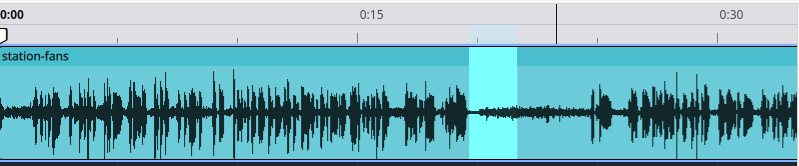
Drag over 1 to 2 seconds where nobody speaks. Audacity needs at least 2,048 samples; longer is better.
Get the noise profile
Effect > Noise removal and repair > Noise reduction > Get noise profileOpen Noise reduction and click Get noise profile. The dialog closes and keeps the profile.
Select all, set 12 dB, apply
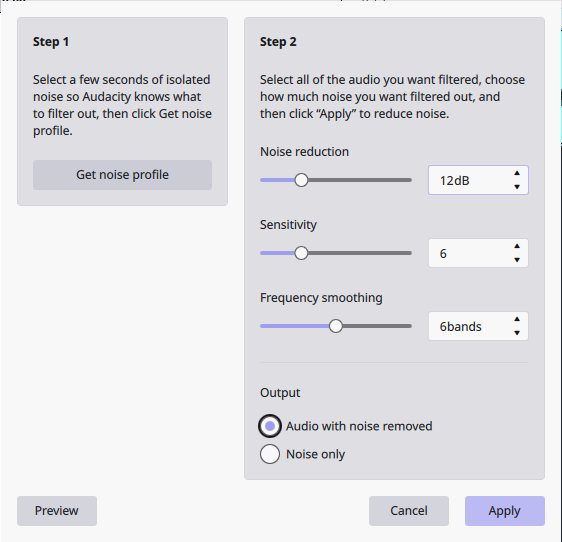
CtrlAOpen Noise reduction again. Set 12 dB, Sensitivity 6, Frequency smoothing 6 bands, Output: Audio with noise removed, then Apply.
Check what was removed
Preview with Output set to Noise only. If you hear words in it, lower the dB.
On Audacity 3.x, and repeating the effect
Audacity 3.x: Effect › Noise Removal and Repair › Noise Reduction. There the output choices are Reduce and Residue. Ctrl+R repeats the last effect with the same settings, handy for a second clip with the same noise.
Fix a problem
What you hear, and the fix in Audacity
| You hear | Why | Fix in Audacity |
|---|---|---|
| Voice sounds watery or "underwater" | Reduction leaves short tones between words. Our watery measure rose from 0.42 at 6 dB to 0.60 at 24 dB. | Stay at 12 dB or below and take a longer noise profile. If the gaps still hiss, add a Noise gate after noise reduction. |
| Hiss is still there after Apply | The default 6 dB is gentle: it lowered the noise by a median of 5.8 dB. | Use 12 dB. Two passes at 6 dB gave the same result as one at 12 dB (21.8 vs 21.5 dB of noise below the voice). |
| Words sound chopped | Sensitivity too high, or noise as loud as the voice, like wind. | Keep Sensitivity at 6. On a windy beach, 6 dB turned 5.1% word errors into 39.2%; 12 dB gave 3.1%. |
| "Noise profile is too short" | The selection is under 2,048 samples. | Select at least half a second of noise. |
| "Sample rate of the noise profile must match" | The profile came from a track at another sample rate. | Take the profile from the same track. |
| Profile gone after a restart | Audacity doesn't keep it when it closes. | Get a new profile each session. |
| Traffic, a crowd or a door slam stays | Noise reduction is for steady noise only. | Cut the sound out, or use an AI speech tool (tested below). |
| Room echo stays | Audacity has no echo or reverb removal effect. | Nothing built in. See the echo results below. |
Why higher settings sound underwater: the watery measure (kurtosis ratio, 0 = untouched) is a measured proxy for musical noise, not a listening test. It is worst in echoey rooms, and on machine hum at 24 dB (1.62).
The test
Audacity's own effect on 40 real recordings
40 recordings of 20 to 45 seconds: echo, hum, traffic, crowds, wind, phone videos and calls, all real, nothing mixed in. Audacity 4.0.2 ran through its own window with the profile taken from each recording's own noise, November 19 and 20, 2026.
| Setting | Noise below the voice (median) | Speech quality (SCOREQ 1–5) | Word error rate (mean) | Clips where words got worse | Voice kept (1 = same) | Watery measure (median) |
|---|---|---|---|---|---|---|
| Unprocessed | 13.1 dB | 2.67 | 8.4% | – | 0.92 | 0.00 |
| 6 dBAudacity's default | 17.2 dB | 2.86 | 9.1% | 8 of 40 | 0.92 | 0.42 |
| 12 dBthe sweet spot | 21.5 dB | 2.97 | 8.0% | 7 of 40 | 0.92 | 0.58 |
| 24 dB | 29.4 dB | 2.96 | 10.4% | 17 of 40 | 0.88 | 0.60 |
| 6 dB twice | 21.8 dB | 2.97 | 9.0% | 6 of 40 | 0.92 | 0.55 |
| OpenVINO Noise SuppressionDeepFilterNet2, Audacity 3.7.9 plugin | 38.5 dB | 3.45 | 11.2% | 16 of 40 | 0.89 | 0.31 |
| OpenVINO Noise SuppressionDeepFilterNet3, Audacity 3.7.9 plugin | 38.7 dB | 3.42 | 15.9% | 19 of 40 | 0.86 | 0.29 |
Words got worse = word error rate more than 2 points above the unprocessed recording. Word error rate: words a speech recognizer got wrong against reference transcripts, scored the same way for every tool.
- 12 dB is the sweet spot
The lowest word error rate of any tool run on all 40 (8.0%; Diffio 8.2%, unprocessed 8.4%). Quality stops rising there.
- 24 dB costs words
8 dB more noise removed, but the voice changes (0.88) and words got worse on 17 of 40 clips.
- It removes what you ask
Median noise drop: 4.1, 8.4 and 16.4 dB at 6, 12 and 24 dB. AI tools pushed noise 38 to 44 dB below the voice.
- The OpenVINO plugin loses words
Far more noise removed, but word errors rose to 11.2 to 15.9%. A quiet street recording was nearly erased (93.7%).
Echo
Echo: what Audacity can't do
- No echo removal built in
Audacity has no de-reverb effect. Its Delay and reverb group only adds echo.
- 12 dB barely changes a room
On 12 echoey recordings, SRMR went from 3.47 to 4.22. Speech tools reached about 12.
- Words held up
Word error rate in those rooms: 9.6% at 12 dB, against 10.4% untouched.
- For echo, use another tool
A de-reverb plugin or an AI speech tool. Removing echo shows how.
Listen
Hear the settings on real recordings
Five recordings from the test. Switch versions while it plays: the playhead stays on the same words. Two clips show where Audacity beats Diffio.
Steady fan noise, what Noise reduction is built for. Words stay the same at every setting; the noise drops from 12.8 to 21.3 to 30.4 dB below the voice.
| Version | Quality | Word errors | Voice kept |
|---|---|---|---|
| Original | 3.05 | 3.1% | 0.92 |
| Audacity 12 dB | 3.38 | 3.1% | 0.92 |
| Audacity 24 dB | 3.43 | 3.1% | 0.89 |
You hear the first 22 s, every version at the same loudness. Recording: ISS crew quarters, ventilation fans, Public domain (NASA, US government work).
Other tools
If Audacity can't fix it: other tools on the same 40
We make Diffio, and we included it. Every tool ran on the same files with the same scoring, November 19 and 20, 2026.
| Tool | Noise below the voice (median) | Speech quality (SCOREQ) | Word error rate (mean) | Clips where words got worse | Voice kept |
|---|---|---|---|---|---|
| Unprocessed | 13.1 dB | 2.67 | 8.4% | – | 0.92 |
| Audacity 12 dBfree, desktop | 21.5 dB | 2.97 | 8.0% | 7 of 40 | 0.92 |
| Adobe Podcast Enhance Speechfree plan, web | 39.3 dB | 4.07 | 10.3% | 13 of 40 | 0.82 |
| ElevenLabs Voice Isolator25 of the 40 recordings; unprocessed 7.8% on those | 44.1 dB | 3.82 | 12.9% | 11 of 25 | 0.84 |
| DeepFilterNet3free, open source | 43.7 dB | 3.43 | 14.6% | 16 of 40 | 0.84 |
| Diffio 4.7 Proours; $1.60 per hour at 5 hours a month | 39.5 dB | 4.58 | 8.2% | 5 of 40 | 0.77 |
Word error rate: words a speech recognizer got wrong against reference transcripts, scored the same way for every tool.
- Diffio changes the voice most
Speaker score 0.77, the lowest of every tool here. Audacity at 12 dB keeps 0.92.
- Crowds are its worst case
On a show announcer, word errors went from 1.9% to 21.1% with Diffio.
- Audacity won on words on 8 clips
Including the airfield clip: 5.7% word errors with Audacity at 12 dB, 24.2% with Diffio.
- A storm at a lighthouse
Diffio kept the voice least there (0.44), where Audacity kept it at 0.92.
In the 5 echoey rooms of our separate 59-clip speech enhancer benchmark, quality (SCOREQ) went from 2.41 to 4.68 with Diffio 4.7 Pro, 4.57 Adobe, 4.42 Cleanvoice, 4.07 ElevenLabs and 3.44 Auphonic. Diffio got more words wrong there (5.8%) than the untouched recordings (4.8%), Cleanvoice (3.9%) or Auphonic (4.2%), and kept the voice less well (0.72) than ElevenLabs (0.78), Auphonic (0.76) or Descript (0.86). See the benchmark.
Limits of this test
- No listening test. "Watery" is an objective measure (kurtosis ratio) and it is noisy clip to clip.
- Audacity at 12 dB is competitive on words and keeps the voice best: 8.0% word errors against Diffio's 8.2%, and a speaker score of 0.92 against 0.77. Its weakness is how little it removes.
- The speaker score compares each output with the noisy original, so tools that remove more score lower. Diffio's 0.77 is still the lowest.
- ElevenLabs ran on 25 of the 40 recordings, so compare it on those.
- Not tested: Audacity's Noise gate, and other Sensitivity and smoothing values.
Questions
Questions about noise in Audacity
How do I remove echo from an Audacity recording?
Not with Audacity's own effects: it has no echo or reverb removal. Noise reduction only lowers steady noise. On our 12 echoey recordings it left the room sound almost unchanged (SRMR 3.47 to 4.22). You need a de-reverb plugin or an AI speech tool; see removing echo.
How do I remove humming in Audacity?
For steady hum, take a noise profile from a hum-only gap and apply Noise reduction at 12 dB. On our 6 hum and machinery recordings, word errors stayed at 4.0% (4.4% unprocessed). Don't go to 24 dB on hum: it was the most watery case we measured (1.62).
Why does Audacity noise reduction make my voice sound underwater?
Too much reduction leaves "musical noise", short tones between the words. Use 12 dB or less, a longer noise profile and Sensitivity 6. If you need more, add a gentle Noise gate afterwards.
What are the best Audacity noise reduction settings?
Noise reduction 12 dB, Sensitivity 6, Frequency smoothing 6 bands. That was the best of 6, 12 and 24 dB on 40 real recordings: the lowest word error rate (8.0%), and the voice unchanged (0.92).
2 more questions
Does Audacity 4 have the AI noise suppression plugin?
Not yet. Intel's OpenVINO plugins work only with Audacity 3.7.x, and Audacity's download page warns they aren't compatible with 4.x. In our test the plugin removed far more noise than Noise reduction but raised word errors to 11.2 to 15.9%.
Is Diffio free to try on a recording Audacity can't fix?
Yes. The Free plan includes 3 uploads, audio or video, with a 2-minute preview of each result on Diffio 4.7 Flash. Downloads and Diffio 4.7 Pro start with Basic. See plans and limits.