Where
Where the noise controls are on phone, PC and web
CapCut app (iPhone, Android)
- Reduce noiseSelect the clip > Edit > Reduce noise
- Enhance voiceEdit > Enhance voice
- Isolate voiceIsolate voiceCapCut says the desktop one is "more professional".
From CapCut's articles and Apple's App Store editorial; we didn't check the app ourselves.
CapCut for PC and Mac
- Reduce noiseSelect the clip > Audio > Reduce noise
- Enhance voiceAudio > Basic > Enhance voiceA level from 0 to 100%.
- Isolate voiceAudio > Basic > Isolate voice > Keep vocal
From CapCut's articles; CapCut lists Reduce noise and Enhance voice among its Pro features on PC.
CapCut web (capcut.com/editor)
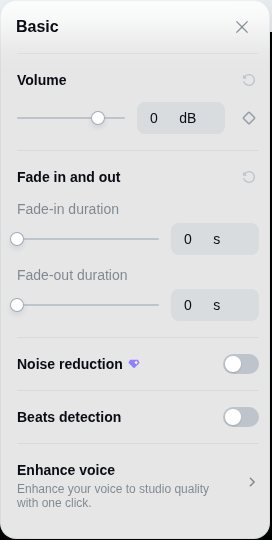
- Noise reductionProAudio clip > Basic > Noise reductionOn a video clip: Audio › Noise reduction. Pro to export.
- Enhance voiceBasic > Enhance voiceListed, but clicking it did nothing for us.
- Vocal EnhancementProVoice changer > Vocal EnhancementThe nearest thing to Isolate voice on the web. Pro to export.
Checked by us, free account, November 20, 2026.
Is it free?
Is CapCut noise reduction free? Not on the web
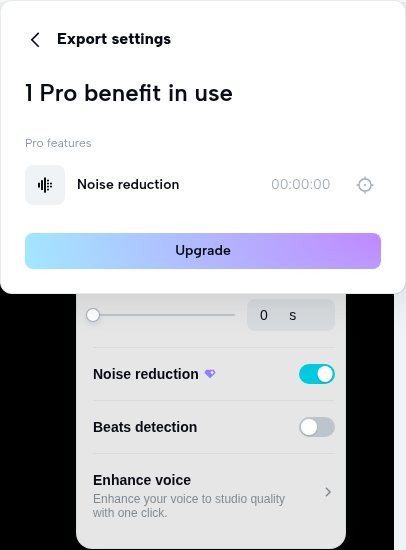
We tried it on November 20, 2026 with a free CapCut account and no card. Noise reduction carries a Pro diamond. You can switch it on, but the download stops and asks you to upgrade.
CapCut's own pages disagree
| CapCut page | What it says | Date |
|---|---|---|
| Remove background noise tool pagecapcut.com/tools | "CapCut uses advanced noise detection technology to clean your audio for free" | undated |
| CapCut Standard vs Procapcut.com/resource | Lists noise reduction among CapCut Pro's advanced AI tools | Nov 12, 2026 |
| CapCut Pro on PCcapcut.com/resource | Enhance voice and Reduce noise are among "10 CapCut Pro features"; free users can try them, but "only exporting the video requires an upgrade" | Aug 27, 2026 |
| Vocal remover freewarecapcut.com/resource | Desktop vocal isolation is Pro: "you need a subscription to export" | Jun 17, 2025 |
Read November 19, 2026. We checked only CapCut web ourselves; on the phone or PC, if a diamond sits on the control, expect the export to ask for Pro too.
- $19.99 a month
CapCut Pro on capcut.com in the US, or $179.99 a year.
- $9.99 Standard
On the US App Store; Pro Monthly is $19.99 there.
- 7-day Pro trial
CapCut's FAQ offers one with no card, depending on region. We didn't test it.
- "For reference only"
CapCut's words for its listed prices, which vary by region and device.
Fix a problem
What you hear after Reduce noise, and what to do
| You hear | Likely cause | What to do |
|---|---|---|
| Hiss gone, but the fan or traffic is still there | Reduce noise targets steady noise. | Try Enhance voice, or Isolate voice on PC. |
| Wind roar on an outdoor phone video | In gusts the wind is louder than the voice. | Isolate voice, or an outside tool. On our 5 windy clips, Adobe Podcast cut word errors from 13.9% to 9.6%, Diffio to 10.7%. |
| Voice sounds thin or processed | The Enhance voice level is too high. | Lower the percentage (0 to 100%). |
| A crowd or music under the voice | Not steady noise. | Isolate voice › Keep vocal on PC. Crowds are hard for every tool we tested: on 6 crowd clips, all raised word errors over the untouched 8.5%. |
| Export asks to upgrade ("1 Pro benefit in use") | Noise reduction and Vocal Enhancement are Pro on CapCut web. | Turn the control off, export, clean the audio in another tool, then put it back. |
The free route around the Pro export
Export without noise reduction
Turn the Pro control off so the export doesn't ask you to upgrade, and export the video (or just its audio).
Clean the audio outside CapCut
Use a free tool or a dedicated speech tool. Some take audio only, so export the audio for those.
Put it back under the clip
Import the cleaned audio, line it up with the clip's start, and mute the clip's own sound.
Wind and phone video
When CapCut isn't enough: tools on phone video and wind
We make Diffio, and we included it with the others. Every tool ran on the same files with the same scoring: 4 phone videos and 5 windy outdoor clips, 40 recordings in all, November 19 and 20, 2026.
| Tool | Phone video: quality | Phone video: word errors | Wind: quality | Wind: word errors | All 40: word errors | Voice kept | Takes video files |
|---|---|---|---|---|---|---|---|
| Unprocessed | 3.06 | 4.6% | 2.12 | 13.9% | 8.4% | 0.92 | – |
| Audacity 12 dBfree, desktop | 3.31 | 5.7% | 2.46 | 10.6% | 8.0% | 0.92 | No, audio only |
| Adobe Podcast Enhancefree plan, web | 4.33 | 4.9% | 3.51 | 9.6% | 10.3% | 0.82 | Free plan: audio only |
| ElevenLabs Voice Isolator25 of 40 (3 windy); unprocessed 7.8% on its 25 | 3.81 | 5.1% | 3.74 | 19.7% | 12.9% | 0.84 | Not checked |
| Diffio 4.7 Proours; $1.60 per hour at 5 hours a month | 4.39 | 5.7% | 4.44 | 10.7% | 8.2% | 0.77 | Yes: MP4, MOV, AVI, MKV, WebM |
Quality = SCOREQ, 1 to 5. Diffio returns an MP4 with the original picture on paid plans. Word error rate: words a speech recognizer got wrong against reference transcripts, scored the same way for every tool.
- Adobe kept the most words
On phone video (4.9%) and wind (9.6%), Adobe Podcast's free plan had the fewest word errors.
- Diffio scored highest on quality
4.39 on phone video and 4.44 on wind, from 3.06 and 2.12 untouched.
- Diffio changed the voice most
Speaker score 0.77, the lowest here. Adobe 0.82, Audacity 0.92.
- Phone video was already clear
Every tool here left slightly more word errors than the untouched clips (4.6%).
Limits of this test
- No CapCut audio was measured: CapCut web wouldn't export it on a free account. This page doesn't rank CapCut or say how well its toggle works.
- The Pro check covers CapCut web only (US, free account). Phone and desktop badges come from CapCut's own pages.
- Phone video (4 clips) and wind (5 clips) are small groups; ElevenLabs has 3 wind clips.
- Adobe's output varied between runs; Diffio's re-runs gave the same word error rate.
Listen
Phone video and wind, before and after
Four recordings from the test. No CapCut version: CapCut web wouldn't export a free noise-reduced file. Two clips show where Adobe beats Diffio.
A typical CapCut source: a vertical phone interview. Adobe kept the words as they were (3.6%); Diffio scored highest on quality and had 4.5% word errors.
| Version | Quality | Word errors | Voice kept |
|---|---|---|---|
| Original | 2.64 | 3.6% | 0.92 |
| Adobe | 4.33 | 3.6% | 0.81 |
| Diffio 4.7 Pro | 4.69 | 4.5% | 0.82 |
You hear the first 22 s, every version at the same loudness. Recording: phone video at a conference venue (Wikimania 2026, Paris), CC BY 4.0.
Questions
Questions about noise in CapCut
Can I remove background noise from a video in CapCut?
Yes. On the phone, select the clip and tap Edit › Reduce noise. On PC, use the clip's Audio panel: Reduce noise, Enhance voice or Isolate voice. In the browser it's the clip's Noise reduction switch, but that needs Pro to export (we checked on November 20, 2026).
Is CapCut noise reduction free?
Not on CapCut web. On November 20, 2026, with a free account, Noise reduction showed a Pro diamond and the export asked us to upgrade ("1 Pro benefit in use"). CapCut's own pages disagree: one tool page says it cleans audio "for free", while a November 2026 article lists noise reduction as a Pro tool. The free route is to export without it and clean the audio in another tool.
How do I remove wind noise from an iPhone video?
Try CapCut's Reduce noise or Isolate voice first. If gusts still cover words, a dedicated speech tool does better: on our 5 windy recordings, word errors fell from 13.9% to 9.6% with Adobe Podcast (free) and to 10.7% with Diffio. See removing wind noise.
Why does CapCut's Reduce noise barely do anything?
We couldn't score CapCut itself: its web version won't export noise-reduced audio without Pro. Simple noise reduction mainly lowers steady noise like hiss and fans. Wind, crowds and music need voice isolation or a dedicated speech tool.
2 more questions
How much is CapCut Pro?
$19.99 a month or $179.99 a year on capcut.com in the US (November 19, 2026). CapCut says prices vary by region and device.
Is Diffio free to try on a CapCut video?
Yes. Upload the video itself; the Free plan includes 3 uploads, audio or video, with a 2-minute preview of each result on Diffio 4.7 Flash. Downloads, including the MP4, and Diffio 4.7 Pro start with Basic. See plans and limits.